Showing posts with label Microstation. Show all posts

Monday, May 2, 2022

DBDOC 11.3 -- Ready to download!

DBDOC 11.3 is an important release that revamps the basic Hyperview interface, provides notably improved support for SPO and 800xA/PG2 graphics, enhanced integration of SPE 2.x, improved AutoCAD and MicroStation support, and live data reliability improvements. It also contains the prototype release of Hyperview in A Browser.

Download DBDOC 11.3 Here
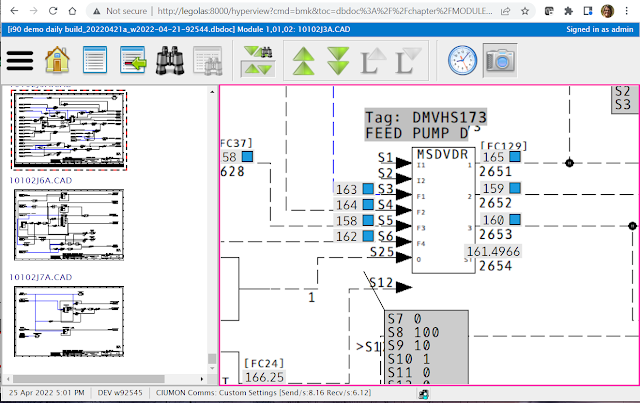
New Hyperview navigation & hotspot interaction.

  • Hyperview now supports a “drag-pan” and “scroll-zoom” as its default interface, for better usability and compatibility with a touch-screen context.
  • Hotspots highlight interactively when you mouse over them.

Improvements to error browser, search & thumbnail support.

  • Errors can now be grouped by file type, including graphics type.
  • Context of surrounding words for search hits can now be displayed.
  • Thumbnails can be enabled separately for CAD/CLDs and general graphics.

Powerful new support for SPO and SPE 2.x systems.

  • BuildPlus “automagically” detects and builds the most recent version of time/date stamped data for SPO SPlus Operations Databases and SPE 2.x Backups, without the need to rename and copy these files
  • In many cases SPE 2.x can be now integrated automatically by BuildPlus without requiring an SPE backup at all.

Improved graphics support.

  • Ongoing improvements to hotspot placement, live data, fonts and colors in SPO graphics.
  • Many improvements to 800xA/PG2 graphics, including better hotspot placement, split Auto/Manual and Cascade/Ratio hotspots, more live data hotspots.

Improved AutoCAD & MicroStation support.

  • Support for AutoCAD ODA 21.11
  • Proper handling of MicroStation files with unicode names.

Live data reliability.

  • Ongoing improvements to Relay and Collector modes.
  • Data fetches are suppressed for the relevant block when certain HOPC errors are encountered, preventing stalls.

Hyperview in a Browser initial release

  • Hyperview in a Browser prototype release: Hyperview’s basic functionality in a touch-screen friendly web browser framework, suitable for tablets over wifi on your LAN, and most browsers on any networked machine.
  • Hyperview in a Browser supports basic navigation, search, and live data.
  • Hyperview in a Browser works on desktop and tablets, in Edge, Chrome, Safari, and Firefox, in all versions and platforms more recent than October 2017.
Give us a call if you would like to try out Hyperview in a Browser! It's not hard to set up, and we can walk you through it.  There is documentation here


Wednesday, September 5, 2018

Welcome to DBDOC 11.0

DBDOC 11.0 is a major release, incorporating fundamental changes to the DBDOC system internals.  DBDOC was originally built on the scaffolding of the Microsoft MediaView library.  Although this was a powerful framework for its day, and has served DBDOC well, over time limitations became increasingly apparent.  DBDOC 11.0 

If you are upgrading from DBDOC 10.7 or earlier, some system-level changes you will notice include the following: 
  • M14 project files have been replaced by dbdoc project files, which are about 30% smaller. 
  • Builds are up to 30% faster than in 10.7. 
  • There is no longer a 2G size limitation on project files. 
  • CrypKey has been removed from BuildPlus, Hyperlink and CIUMon and replaced with new dongle protection.
Farewell M14 file!

When you update your installation to DBDOC 11.0, you will notice that DBDOC's faithful M14 file has retured, and been replaced by a "dbdoc" file.  This project file is usually considerably smaller than the M14 for the same system, and does not have a two gigabyte size limitation as the M14 file did.

Welcome hyperview.exe!

The Hyperview executable is now called hyperview.exe, instead of hyperview_winsock.exe.  You will notice that a modified version of hyperview_winsock.exe is also in your 11.0 installation, however.  Both are set up so that they seamlessly interoperate.  

If you attempt to open an M14 file with hyperview.exe (11.0 Hyperview), hyperview_winsock.exe (i.e. 10.7 Hyperview, basically), will be automatically started up to view it.  Similarly, if you attempt to open a dbdoc file with the 11.0 version of hyperview_winsock.exe, the new version of Hyperview will be automatically launched to display it.  

Project file wildcards (*, *.M14) are both interpreted to include dbdoc files as well as M14 files.  In most cases, this should allow shortcuts and scripts for launching Hyperview to remain unchanged.

Powerful access to the DBDOC snapshot.

In DBDOC 11.0 you can explicitly export much of the configuration information found in the DBDOC system snapshot into a standard, non-encrypted SQLite database.  This exported database has similar contents to the "master.db" database produced during builds of earlier versions of DBDOC.  

This database contains information about specifications, wiring, blocks, tags, and errors, all of which can be accessed by your own tools for your own purposes.  Please contact us for help making use of this valuable resource.

Everything looks better.

All text documents in Hyperview are now HTML, which opens up many improved formatting possibilities as well as routine Unicode support. The toolbar icons have received a facelift. Error markers no longer obscure block numbers, and live data no longer obscures function codes on CAD/CLDs. 


There are important improvements to the Watch Window, Audit Window and searching. 

You can now have large font labeling in the Watch Window, with configurable text size. Tags have been added to Watch Window plot labels, as well as better selection highlighting to make plots easier to read. You can now set a start time for the plot display, allowing you to focus easily on the most recently taken data for a group. Watch Window groups of block can now be exported and imported. 

The Audit Window has been reworked and is now easier to interpret. Audit entries that were effectively errors (e.g. unconfigured graphics) have been removed, but can still be seen in the Error Browser.  

Searching has been fully reimplemented in this release, but there should be no substantial behavior changes. 

Builds are faster, friendlier, safer, and can be larger. 

Builds are typically 30% faster than in 10.7, and project files about 30% smaller. The 2G project file size limitation is gone – test projects of close to 10G have been built. This allows a single build in cases where splitting the system would previously have been needed, and also facilitates the inclusion of more documentation types into the build. 

A new Wizard Configuration Tool lets you change Wizard settings without processing files – the new settings will be applied to the next build. 

Chapter titles generated for a build are now as short as reasonably possible, so that they can be better seen in Hyperview – only path subsets required for distinguishing paths are included. 

Improved support for SPlus and 800xA graphics. 

Presentation of dynamic bars, hotspot locations, and links to target graphics on buttons have been fixed or improved.  Support for control stations tagatoms improved on 800xA graphics. S+ horizontal dynamic bars are now properly displayed. 

Improved support for PDF, AutoCAD, MicroStation and text documentation. 

Links are now automatically made on pseudotags on these document types, very large dimension PDF files now display properly, and search results on PDF files are more accurately placed.

Iproved error and CAD support. 

New AOLDB and REDAI errors are detected. New FC 69 S1 error detected. 

CIUMon live data is more robust. 

A new monitor process tracks whether live data is being actively transmitted by CIUMon. It will disappear if CIUMon is unable to get data, freezes, or crashes. 


See the full Release Notes for further information on DBDOC 11.0 and prior versions.


Tuesday, November 15, 2016

Built-In PDF Files and More! PDF File Support in DBDOC 10.7

You all have PDF files, integral to the support of many systems. DBDOC now supports them in an unprecedented way.

DBDOC has supported viewing PDF files with a PDF viewer for many years. This has been very useful. However, this support lacked the full suite of features that are integral to DBDOC. The new support adds these critical features:
  • You can search for text in all the PDF documents you build in at once. Conventional searching is limited to the document you have open.
  • You can have links from the PDF file to tags in your DCS configuration. This means you can simply double-click on the tag name link and go to its source on a CLD or CAD sheet.
  • You can also have links from the PDF file to other documents. Since DBDOC supports AutoCAD, Microstation, PDF files as well as your DCS configuration and graphics files, this can give you powerful inter-connections in your documention.
Let's look at the three ways that PDF files are now supported in DBDOC.
  1. The new support to compile them into the M14
  2. The existing support to link external files to be viewed by a PDF viewer
  3. The existing support to the Function Code PDF file documentation from ABB

1. Compiling PDF files into the M14


You can now view and browse pdf files directly in Hyperview.  For most people, this support will simply replace the linking they used to do. DBDOC will be even more useful than it was. Searching, tag  and document links will be automatic. You will find it natural and satisfying.

2. Linking external PDF files to be viewed by a PDF viewer


So why would you link PDF files? One client has a very solid application involving maintenance orders. By linking fixed file names to the most recent version of the document, people get to the current version. When it is updated, the new version is linked, because the name has not changed.

This feature remains supported, so you can have very good access to the information in PDF files by compiling them, while supporting access to system-wide documents by name.

3. Supporting the Function Code PDF file documentation from ABB


DBDOC implements support for calling up the ABB Function Code PDF file information by a "right-click" on the function block image. The feature works for individual files, plus for one-volume and two-volume document sets.

Where do we go from here?


We are at the starting point in our development of this support. Your feedback about things we ought to think about will be very useful. The support is important to DCS systems supported by DBDOC.