Showing posts with label case study. Show all posts

Wednesday, October 26, 2016

A System Without DBDOC - Analysis II

This analysis focuses on the 219 errors in this site where TSTQ blocks test blocks inappropriately. There are 209 inputs to TSTQ blocks being tested that do not have quality to test. In addition, quality is being tested on ten AO/L blocks that do not have quality on their input signal.  I began this analysis in the earlier article: A System Without DBDOC - Analysis I and continue it here. Keep in mind that this is a running power plant!

TSTQ Testing Blocks Without Quality


To keep this brief, the images will show the block being tested. Be confident that it is feeding a TSTQ block input and that the intended protection for the plant is simply not present. Also, you might not be familiar with the feature of DBDOC that shows lines that can carry quality in blue, to contrast with lines that cannot carry quality in black.

Engineering Errors


It turns out that, in this system, somebody did not get the point about the TSTQ block. Half of the errors show places where the logic state of a function block is [1] in the alarm condition, but that state is fed into a TSTQ block instead of affecting the process by being input to an OR operation directly. 

TSTALM Block 8272 output does not have quality (note that it is a black line).  Therefore the TSTQ Block 8917 that tests it will never trigger due to this signal.  Nor will it trigger due to the actual situation the system designer presumably wanted to detect: that of TSTALM Block 8272 being [1].


The two instances of testing the low output (H//L Block 9763) are just as incorrect. The result should be OR'd, not tested for quality.

In these and similar situations, operational issues will fail to be detected as intended. There are 105 instances where a TSTQ tests a TSTALM [FC69] block, which does not have quality.  There two instances where a TSTQ Block tests a H//L [FC12]  block N+1, which also does not have quality


Blocks Not Propagating Quality


A common misconception is that AO/L [FC 30] and DO/L [FC 45] blocks are guaranteed to show bad quality. In fact, they only propagate the quality attribute. Thus, if the input to the block does not have the quality attribute, there will be no quality to test.

There are seven instances where a TSTQ tests an AO/L block, which is not propagating quality, and three instances where a TSTQ tests a DO/L block, which is not propagating quality.


A Sublime Example


Here is a sublime example of a class of error that occurs again and again. Good engineering is clutched from the jaws of victory! Here, TSTQ and REDAI blocks validly synthesize a picture of two versions of COMPENSATED GAS FLOW. However, the use of Transfer [FC9] Block 1835 destroys the quality chain, so bad quality will not be detected by the process. The problem would not have existed if a REDAI block had been used instead to propagate this signal.


More Flawed Quality Tests


In all the following instances, quality is checked to no end, and the actual quality information is lost.  In most cases, simply testing the input to the function block whose output is being tested would solve the problem and allow a bad quality signal to be detected and acted upon.

  • 2 instances - TSTQ tests F(x) [FC1] which does not have quality
  • 2 instances - TSTQ tests A [FC2], which does not have quality
  • 2 instances - TSTQ tests H/L LIM [FC6], which does not have quality
  • 2 instances - TSTQ tests SQRT [FC7], which does not have quality
  • 20 instances - TSTQ tests T [FC9], which does not have quality
  • 8 instances - TSTQ tests SUM(K) [FC15], which does not have quality
  • 23 instances - TSTQ tests [NOT FC33], which does not have quality
  • 3 instances - TSTQ tests S R [FC34], which does not have quality
  • 33 instances - TSTQ tests OR (2-Input) [FC39], which does not have quality
  • 1 instance   - TSTQ tests OR (4-Input) [FC40], which does not have quality
  • 1 instance   - TSTQ tests REMSET [FC68], which does not have quality
  • 4 instances - TSTQ tests M/A MFC/P [FC80], which does not have quality
  • 1 instance   - TSTQ tests TRIG [FC171], which does not have quality

Conclusion


This analysis show a plant operating with hundreds of errors DBDOC has detected by flagging TSTQ block inputs that do not have quality to test. Half of them are especially worrisome because they show incorrect engineering that was never detected, i.e. it was the original intention to test a signal, not the quality of the signal, in the first place.  Was there a FAT (Factory Acceptance Test)? If so, it missed them all.

Wednesday, August 3, 2016

DBDOC 10.7: Now Detects Unitialized Rung Stacks

We always have our eyes out for new error situations that DBDOC can detect and protect you from.

At a training session recently, we happened to notice a FC 111 rung block with mysterious output [1] (blue). This made no sense, because the logic is OUTPUT = (S13 OR S14 OR S15 OR S16) AND S17, but none of S13-16 are [1] (blue), so the output shouldn't be [1], but it is. We verified the specifications, which matched what the CLD showed.


There are actually two different reported errors on this particular block, as you can see from the presence of two error markers.  There is also an unreported error, which we will describe for completeness.

Rung block spec is wired but unused

The first (reported) error is reported as follows:

Rung block spec is wired but unused [ERROR 124]

Rung block Module 9,25,05 Block 7660 S12 is wired (block 3006) but unused by S2 value 000[92505F2A.CAD]
S2 is the operation that acts on input S12, but S2 is 0, which means ignore the input, and instead use the value from the top of the stack.  It may well be unintentional that S2's value be ignored.

Operation on an unwired input

There is actually another error which is not reported, because it makes no difference to the output:

The specs S2-S11 are operations on inputs S12-S21.  Some of these inputs (S16, S18-21) are unwired, and their corresponding operations are 0, as expected, except for S16.  S16 is unwired, but S6 is 12, not 0.   So to correct this error, S6 should be changed from 12 to 0.  However, the outcome is the same whether or not this "error" is corrected, so DBDOC doesn't report it.

New in 10.7: Rung stack not initialized

There is also another problem, the second reported error, which is the one causing the unexpected [1] output:

Rung stack not initialized [ERROR 306]

Rung block Module 9,25,05 Block 7660 logic invalid because S3 is an OR operation[92505F2A.CAD]
This is a type of error newly detected in DBDOC 10.7.  It is capable of causing a significant system error.

How these rung blocks work is that each operation is carried out in order, and the result of each operation is placed on the stack.  The next operation is typically an AND or OR with the current input and whatever is on the stack (i.e. the result of the previous operation).

  1. In this case, the first operation is S2 (0) performed on input S12.  0 means use the value from the stack, i.e. ignore the actual input value S12.  As it happens, the uninitialized stack value is [1]!   But in any case S2 accomplishes nothing.
  2. The next operation is S3 (12) performed on input S13.  This means OR the input S13 with the value on top of the stack.  Well, the value on top of the stack is [1], so the result of this operation is always [1], regardless of whatever S13 is.  So this operation is also pointless.
  3. Similarly, S4 and S5 also OR their corresponding inputs with [1], yielding [1] on top of the stack.
  4. Finally, S7 is 11, which means AND the input ([1] in this case) with the top of the stack (current top of stack is guaranteed to be [1]), for an inevitable [1] final output, regardless of the values of S2-S5.
The basic problem here is that the stack was not initialized. The logic would make sense if S2 was 10 (PUT) instead of 0.  S2=10 would mean put the value of S12 ([0]) onto the stack.  Then the next operation, S3 (12), would OR [0] with the value of S13, yielding the value of S13, instead of a guaranteed [1].  

(Technically, S3 could be 10 (PUT) instead (if S2 was actually meant to be ignored), hence the error message complaining that S3 is OR.  And either S2 or S3 could also be an 11 (AND) with no change in result).

The important thing is that the stack needs to be initialized sensibly with a PUT (x0) or an AND (x1) before it is used, or there will be unexpected results. 

Enjoy these examples from real systems.  DBDOC Version 10.7 and beyond will detect this uninitialized stack problem if you happen to have it lurking in your system.

Some details for those not familiar with DBDOC:
  • Blue lines show a signal that carries the quality attribute.
  • A white box shows value [0] whereas a blue box shows value [1].
  • DBDOC presents the rung logic as a little ladder diagram.
  • The little "top hat" symbol means a change from [0] to [1], triggering a [1] for one cycle.
  • Specs can be moved in DBDOC to get them out of the way.
  • The warning triangle shape is an Error Marker, informing you of a DBDOC message.
  • The yellow box is a data tip telling you about the Error Marker.
These examples come from power plants in Delaware, Pennsylvania, Michigan and Wales. Where the logic was not used, the question can be asked if that was caused by inability to commission it.


Friday, August 22, 2014

Managing Errors with the Error Browser: Function Generator errors

DBDOC has noted CHECK messages for over a decade.  Errors are classified with a CHECK severity (as opposed to ERROR) when many or most of them will not actually cause a process problem, yet certain circumstances exist where they could.   ERROR severity errors should be investigated and corrected first, and then CHECK severity errors can be addressed.

One example of a CHECK error is "X coordinates out of order for F(x)", which is DBDOC's check on the order of the X coordinates in FC 1, F(x) Function Generator block.

The X coordinates (the even numbered specs from S2 to S12 for a Function Code 1 block) must be in ascending order for the block to work properly. Essentially, linearization is done stepwise, with only one pair of coordinates involved. However, many of these blocks have inconsequential errors where the output is flat, or there are minor round-off errors, or the blocks are simply not used. Some have the errors outside the design range of the calculation. It's important to identify the particular situations where an actual problem is present.


Suggested process for analyzing CHECK errors with the Error Browser

Below we work through this process in a system with 39 such errors. We will walk through the steps of figuring out which of these are potential process-affecting errors, and which can be safely hidden and ignored. This can only be determined in the context of each specific site

We open the Error Browser, set Show these errors to "All," set  Group by to "Severity" and then by to "Error Name," and press Rebuild Tree.  The tree now shows all the different types of errors in the system, organized by their severity.

In general, it makes sense to hide CHECK errors and other errors less severe than ERROR errors (e.g. COSMETIC, INTERNAL).  They will then be out of your way while you focus on the ERROR severity errors.  When you are ready, come back to the CHECK errors, and identify those that could cause problems.  In this example, it took me about a minute to analyze the 39 " X coordinates out of order" errors and identify the single one of those that was actually a cause for concern.

Here is an Error Browser procedure to follow for this error type, and generally speaking, for any other CHECK severity error:
  1. Set Show these errors to "All," set  Group by to "Severity" and then by to "Error Name," and press Rebuild Tree.
  2. Select the error type of interest, in this case "X coordinates out of order for F(x)".
  3. Mark them all as Hidden.
  4. When you have time, walk through each error, checking if the block it refers is actually used.  If it used, Star it.
  5. Mark the errors that you have walked through as Reviewed.  Now they are both Reviewed and Hidden, and need not be further worried about.
Analyzing the starred error is outside this minute, of course.


Marking the "X coordinates out of order for F(x)" errors as Hidden

Click on the "X coordinates out of order for F(x)" in the tree to select all errors of that type, then click on the Hide icon to hide them.  This will get them out of your way until you are ready to walk through them in detail.  Because they are CHECK errors, they are unlikely to be causing any problems, but a few of them might be.


Walking through the errors, checking which problem blocks are actually used

 
Click on the first "X coordinates out of order for F(x)" message. You will see both the message details in the lower panel of Error Browser, and the function generator block it pertains to on the CLD in the main browser window.
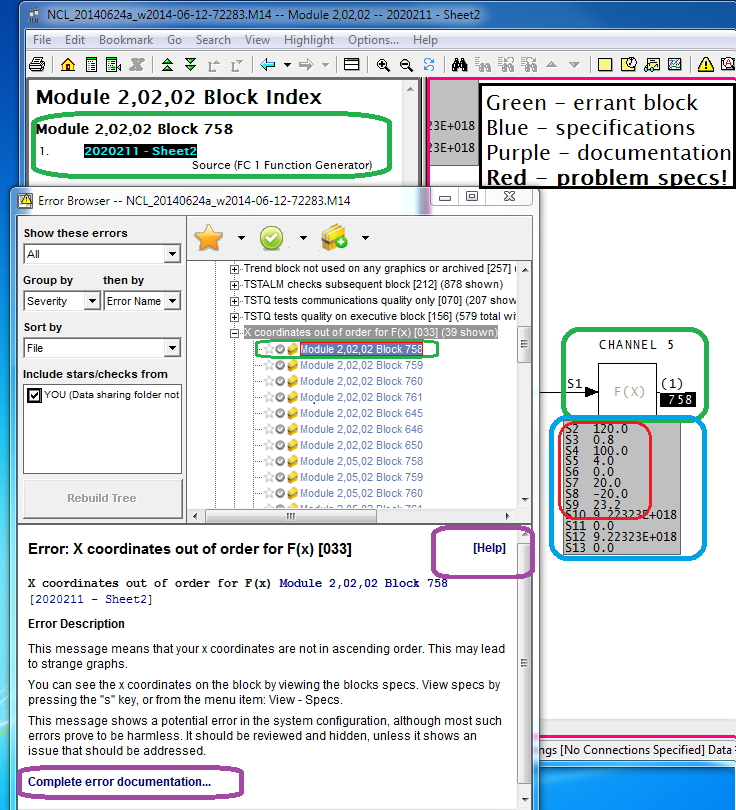
  • The block index shows that the F(x) block in question is used in only one place (that is, it is not imported anywhere else) [green].
  • Links to complete documentation of the message are available [purple].
  • The specifications [blue] are there to examine. The problem with the specifications [red] is evident. The X coordinates (even numbered specs) are decreasing, not increasing. This block will give an output of 0.8 for all inputs less than 120.0, and 23.2 for inputs more that 120.0. It doesn't work.
But you do not care, because the F(x) output is not used.  If it were used, there would be more than one entry in the Block Index.

Arrow down through all the error messages of this type, and all but one will turn out to be unused.


The F(x) block with "X coordinates out of order" that is actually used

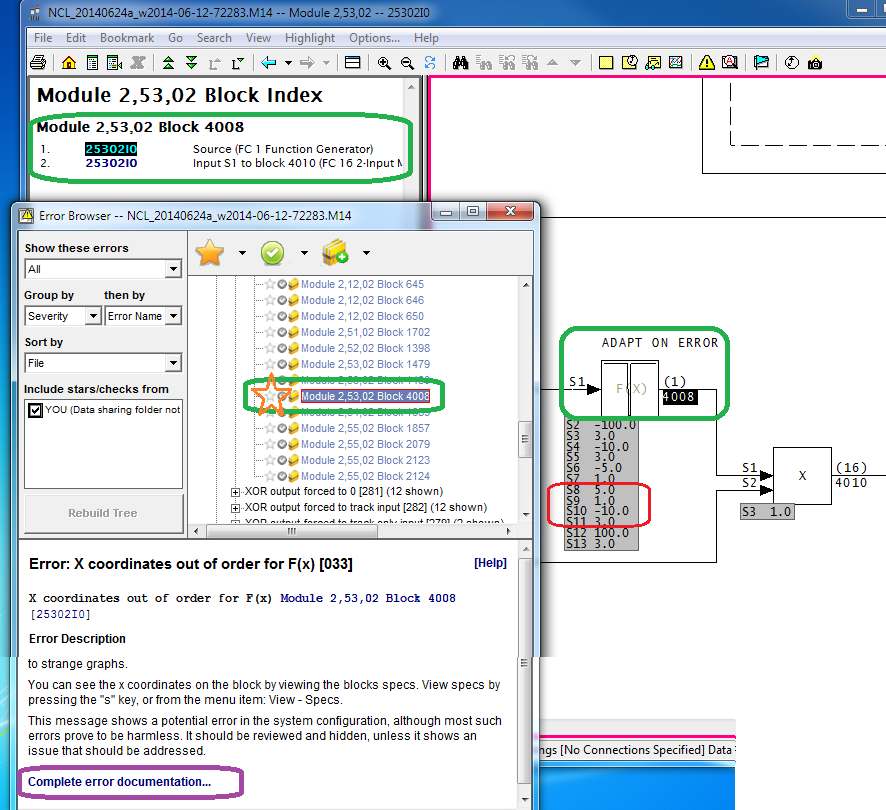
Only one block with this error is actually used in the process.  You can see (below) that it is used because more than one item (the block source, as well as its use) show up in the Block Index.

The output value is wrong in the input range from 5.0 to 10.0. Like the negative side, it is supposed to rise linearly from 1.0 at 5.0 to 3.0 at 10.0. Instead, the output jumps from 1.0 to 3.0 when the input reaches 5.0. Analysis of the logic using the FC 16 multiply block is needed to determine how adversely this will affect the process. However, if you consider that the output is 3.0 for all values of input other than from -10.0 to 10.0 (by design), it is clear that 25% of the design effect is missing. Furthermore, one can worry about the effect of the step function in the output, something that DBDOC also has flagged.
 
Click on the Star to mark the problem error. You can also Unhide it. Now you can Rebuild Tree, which shows up whenever the Error Browser presentation would change. I also changed to show "Active" errors instead of "All", which makes all the Hidden errors not show up in the tree.


What is the error? You must be curious by now.
 
The messed up number feeds an adapt block that affects the overall gain of an APID block controlling a tag called 2LIC-459 "GREEN OIL TOWER REFLUX DRUM". The error means that there is no gradual ramping of the overall gain from 1.0 to 3.0, which might be nasty. On the other hand, GREEN OIL TOWER might no longer be used at all, or perhaps never installed, or whatever. DBDOC makes it all as easy as A, B, C.
  • A - The Function Generator Block 4008 is flawed, making a step change in the value where it should be smoothly changing.  This feeds into Multiply Block 4010.
  • B - The bad output from Multiply Block 4010 is fed into the Adapt Block 4011.
  • C - The bad value is set into S11 of APID Block 4016.
  • D - As a result, APID Block 4016 has a step change in overall gain in part of its operating range.
  • E - The output signal generated will jump if the error (my guess) exceeds 5.0.
  • F - Control of 2LIC-459 will be dicier than it should be, because control signals will be more extreme than designed.


Displaying the actual F(x) Block function, with live data
 
As an aside, DBDOC will show you the actual F(x) Block function, with its live data (but not here, because I do not have the plant data). You turn it on by right-clicking the output block number [A]  and selecting the live function graph feature [B]. Double-click on the graph [C] to dismiss it.


Getting more information: Help links in the Error Browser
This is as good a place as any to mention the fully featured help that is built into Error Browser, from the purple highlights above.


Wednesday, August 6, 2014

Surprise! Your TSTALM Blocks may put random device drivers into override (or do even worse).

TSTALM blocks can easily be misconfigured when working logic is reused. The most common error is simply failing to change the input specification to get the status from a different block (i.e. S1 is accidentally left unchanged when the function block is copied and reused, and thus both old and new TSTALM test the old block, and nothing tests the new block). When this error is made, there are invariably two consequences:
  1. Action that is intended to be taken does not happen when it should.
  2. That very same action does happen when it should not.
This note analyzes just one of thirteen instances identified by DBDOC in a particular system where a TSTALM block tests a block that already has a TSTALM applied to it (in fact two of these errors are not a concern, because previous examination has shown that the incorrect action is not taken because the signals are unused).  The remaining eleven messages in fact indicate twenty actions that will not happen when they should, plus twenty places where the same action will happen when it should not.

Of course, a situation where a TSTALM block triggers one or more wrong actions, and where the designed TSTALM block fails to trigger the desired action, can be serious for any block type.

Example:

The TSTALM error is typically caused caused by the DCS worker failing to change specification S1 to match logic that is put onto a sheet and given new block numbers.  So the block is copied, but the TSTALM S1 is not changed to match the new block it is supposed to be testing.

Take a look at this image:


[A] Error Browser: Multiple TSTALM: Module 1,10,04 Block 3623 is tested multiple times

This error is selected in the error browser.  It indicates that more than one TSTALM block is testing Block 3623.  The Error Browser shows a total of thirteen errors of this type.
 
 
[B] TSTALM Block 3632 -- The working original
 
The MSDRVR (Block 3623) is being tested correctly for being in Auto or Manual because the TSTALM (Block 3632) shown has S1=3623, indicating that it tests MSDVDR Block 3623. 
 
 
[C] Intended action on block in Auto or Manual
If TSTALM (Block 3632) is put into Manual, its output at block 3633 will be 0. However, if TSTALM (Block 3632) is put into Auto, block 3633 will be set to 1.
 
 
[D] OR block with this result in it
 
Clearly documented "OVERRIDE TO DEFAULT", this action works in the prototype logic.  When TSTALM (Block 3632) is in Auto, the S25 override input into MSDRVR (Block 3623) will be set.
 
 
[E] The MSDRVR block Override input
 
The diagrammed MSDRVR (Block 3623) will be put into Override when it should be.
 
 
[F] Working action
 
Tag 1SLWHS806 "FLUSH WATER PUMP" will be put into Override if TSTALM (Block 3632) tests the  MSDRVR (Block 3623)as expected.
 
 
[G] Seven errors:  MSDRVR (Block 3623) is spuriously tested by SEVEN other TSTALM blocks.
 
The block index shows seven more TSTALM blocks responding to the status of tag 1SLWHS806 in a spurious and possibly dangerous fashion.
 
These seven  TSTALM blocks, each with their S1 set incorrectly to 3623, are displayed below.


Each of these seven TSTALM blocks will put some random MSDVDR into Override when the unrelated MSDRVR (Block 3623) is in Auto, and at the same time fail to put the expect block into Override when it should. 
 
Ramifications:
 
Some of the failed or unintended actions might be noticed. Others will not be until a problem arises. It is very likely that the cause of the sporadic operation will not be found if the problem actions or failed actions are noticed, because there is no expected logical connection between these unrelated blocks.

Tuesday, November 12, 2013

Error example: The case of the not quite identical clones.

This is the story of one error in a system with two approximately cloned units.
 
The error message is simple.  It says that a FC 36 8 input qualified or (QOR) block does not have enough inputs wired to be able to trigger a "1".
 
Image 1 shows the following DBDOC aspects of the error message, starting from the Error Browser.
  • A - The error is selected in the Error Browser.  Note it is the only error of this type.
  • B - Clicking on it brings up the detailed description, plus the location on the sheet where the error is found (Image 2).
  • C - Note how Error Browser makes new detailed error documentation available to the user.
  • D - The documentation called up by asking for "Complete error documentation".
  • E - The documentation showing explanation and example (not from this system, of course).
Image 1
  
Image 2 shows how Error Browser brought up the flagged block in the sheet.
  • F - The block number is highlighted, and the block index available to show where it is used.
  • G - The specifications show S9 is 8.  With only 6 inputs, the output can never be 1.
Note, however, that this is a clone of another unit, which did not have the error. 
  • H - The text of the reference on this output, which we can search for in the other unit.
Image 2
 
Image 3 shows how Hyperview text searching finds the reference text to resolve this question.
  • I - Search for the (case insensitive) text of the reference on the sheet with the error.
  • J - Go to the result in the first unit.
  • K - Here is what you find.
  • L - The logic in the first unit was originally a rung block - FC 111.  
Image 3
 
The error, it turns out, was introduced when the rung block was changed into AND logic implemented with the FC 36 block, but incorrectly.  There is a good reason not to have cloned errors. 
 
Cloning is beautiful - it replicates tested, working logic.  When a message or error is noted, it would be expected to be in all similar instances.  If a message is not replicated, it can mean:
  1. the error was fixed in another copy
  2. the error has not yet been made in the other copy
  3. the copy is not an exact clone
The error in this example is in the third category, logic that is not exactly the same in the clone.  Watch out for situations like this!