Showing posts with label error analysis. Show all posts

Wednesday, October 26, 2016

A System Without DBDOC - Analysis II

This analysis focuses on the 219 errors in this site where TSTQ blocks test blocks inappropriately. There are 209 inputs to TSTQ blocks being tested that do not have quality to test. In addition, quality is being tested on ten AO/L blocks that do not have quality on their input signal.  I began this analysis in the earlier article: A System Without DBDOC - Analysis I and continue it here. Keep in mind that this is a running power plant!

TSTQ Testing Blocks Without Quality


To keep this brief, the images will show the block being tested. Be confident that it is feeding a TSTQ block input and that the intended protection for the plant is simply not present. Also, you might not be familiar with the feature of DBDOC that shows lines that can carry quality in blue, to contrast with lines that cannot carry quality in black.

Engineering Errors


It turns out that, in this system, somebody did not get the point about the TSTQ block. Half of the errors show places where the logic state of a function block is [1] in the alarm condition, but that state is fed into a TSTQ block instead of affecting the process by being input to an OR operation directly. 

TSTALM Block 8272 output does not have quality (note that it is a black line).  Therefore the TSTQ Block 8917 that tests it will never trigger due to this signal.  Nor will it trigger due to the actual situation the system designer presumably wanted to detect: that of TSTALM Block 8272 being [1].


The two instances of testing the low output (H//L Block 9763) are just as incorrect. The result should be OR'd, not tested for quality.

In these and similar situations, operational issues will fail to be detected as intended. There are 105 instances where a TSTQ tests a TSTALM [FC69] block, which does not have quality.  There two instances where a TSTQ Block tests a H//L [FC12]  block N+1, which also does not have quality


Blocks Not Propagating Quality


A common misconception is that AO/L [FC 30] and DO/L [FC 45] blocks are guaranteed to show bad quality. In fact, they only propagate the quality attribute. Thus, if the input to the block does not have the quality attribute, there will be no quality to test.

There are seven instances where a TSTQ tests an AO/L block, which is not propagating quality, and three instances where a TSTQ tests a DO/L block, which is not propagating quality.


A Sublime Example


Here is a sublime example of a class of error that occurs again and again. Good engineering is clutched from the jaws of victory! Here, TSTQ and REDAI blocks validly synthesize a picture of two versions of COMPENSATED GAS FLOW. However, the use of Transfer [FC9] Block 1835 destroys the quality chain, so bad quality will not be detected by the process. The problem would not have existed if a REDAI block had been used instead to propagate this signal.


More Flawed Quality Tests


In all the following instances, quality is checked to no end, and the actual quality information is lost.  In most cases, simply testing the input to the function block whose output is being tested would solve the problem and allow a bad quality signal to be detected and acted upon.

  • 2 instances - TSTQ tests F(x) [FC1] which does not have quality
  • 2 instances - TSTQ tests A [FC2], which does not have quality
  • 2 instances - TSTQ tests H/L LIM [FC6], which does not have quality
  • 2 instances - TSTQ tests SQRT [FC7], which does not have quality
  • 20 instances - TSTQ tests T [FC9], which does not have quality
  • 8 instances - TSTQ tests SUM(K) [FC15], which does not have quality
  • 23 instances - TSTQ tests [NOT FC33], which does not have quality
  • 3 instances - TSTQ tests S R [FC34], which does not have quality
  • 33 instances - TSTQ tests OR (2-Input) [FC39], which does not have quality
  • 1 instance   - TSTQ tests OR (4-Input) [FC40], which does not have quality
  • 1 instance   - TSTQ tests REMSET [FC68], which does not have quality
  • 4 instances - TSTQ tests M/A MFC/P [FC80], which does not have quality
  • 1 instance   - TSTQ tests TRIG [FC171], which does not have quality

Conclusion


This analysis show a plant operating with hundreds of errors DBDOC has detected by flagging TSTQ block inputs that do not have quality to test. Half of them are especially worrisome because they show incorrect engineering that was never detected, i.e. it was the original intention to test a signal, not the quality of the signal, in the first place.  Was there a FAT (Factory Acceptance Test)? If so, it missed them all.

Friday, October 7, 2016

A Support Query: Importing the Wrong Value from an M/A Station Block

Dear Support:

I was wondering if you could explain this error to me.


Dear Client:

For sure.

One place block 3088 is used is as a block imported by an AI/L.
The exception report from an AO/L block looks like this:
  • one byte - status bits, including H, L, Q
  • one real - value of the AO/L
The exception report from a STATION block looks like this:
  • one byte - status bits, including H, L, Q, Deviation
  • three real values in this order
  •     value of the PV (S1)
  •     value of the SP (output N+1)
  •     value of the CO (output N)

The AI/L block reads and supports the first two values - one byte, from which it gets the quality, and one real, which it imports as the value.

The message tells you that the value of the AI/L block imported equals that of the PV of the station block, something like 239 (S1), not the CO value of 46% (Block 3088), which is probably what is expected.

Please send the same screen shot, but also the AI/L block.


Dear Support:
The AI/L block


Dear Client:

As you see, the description PLANT AIR FLOW CONTROL OUTPUT just does not cut it. In fact, 46% would not be not high enough to trigger the 50% level in the subsequent H//L block, but the erroneously imported PV of 239 is.

You could insert an AO/L after the station block, to transmit the actual output value to the AI/L block.

However, a simpler way might be to put an H//L block on the page where the Station block 3088 exists and send the output of the H value to a DO/L, then import that DO/L here.

Does this now make sense?

Friday, September 9, 2016

Output Spikes - Sharp as Tacks!

This does not look good!


Here is a warning about derivative gain from a site, highlighted in the Error Browser.


PID Module 1,06,02 Block 214 uses derivative with PV from discontinuous input Module 1,06,02 Block 140

You can see the error marker next to the PID block it concerns.


Dan Reynolds sent me the data from the control loop identified. Here is what it looks like with DBDOC WatchWindow at 250 ms.


Zooming in a bit, we see that Block 280, the output, suffers spikes from its railed value of -5.0%. Block 214 shows a value of +1.7408%, that is, 6.7408 above the -5.0% it should be. The exception reported input Block 140 changes each minute and drives these spikes (not all of which are picked up in the 250ms reporting interval, since they are so brief). You can be sure that, if the control output were in the 0 % to 100% range, large positive and negative spikes would be suffered every minute. Ouch!


Just as clearly, if this PID output were not driven to -5 %, the spikes would be bi-directional and still significant. The effect is purely caused by the value of Kd on S8 for Block 214, only 0.2, but enough to drive the output in a way that is not valid.

By the way, you should notice how any exception report input has steps in its value. The values for Module 1,06,02 Block 140 and Module 1,03,04 Block 1901 show these characteristic steps. See Monitoring Exception Report Performance for details.

Monday, August 8, 2016

Alarm Management Needs Error Management

Does your system contain alarms that cannot actually ever occur?  Many do.

Alarm management focuses on understanding and controlling the alarms that can be generated in a system.  DBDOC provides techniques for walking through the configuration systematically to validate assumptions and look for problems. Effective alarm management is impossible without error management and configuration analysis.

Here are three example sets of alarms that do not work in a single powerplant configuration:
  1. Intermittent failure caused by duplicated exception report imports
  2. Detected failures to test blocks with quality
  3. Problems that can be found by using DBDOC to walk through the configuration easily
If you do not manage your errors and use the tools DBDOC provides to audit the configuration, you will not be able to manage alarms. Even worse, you can spend a great deal of money fooling yourself about alarms.

Example 1 - Frozen Import Block Error


INFI 90 allows block values from one module to generate "exception reports" when the block value changes status or value. In the case of an analog exception report, the new value is transmitted when it changes by an amount that is specified as "significant".

If a an exception report block value is imported more than once into a module, only one of the import blocks works. The values of any other blocks importing the exception report block value will remain frozen. Furthermore, when an on-line configuration is done, a second import block will silently begin working (!) and the block that was working will freeze at its last value. This applies to both analog and digital exception reports.

DBDOC detects and reports this error. However, when the module is compiled using Composer, the error is not detected.

      Error: Frozen import block [093]

      Duplicate off-module reference (DI/L, DI/L) to Module 1,01,05 Block 1230: 1020324 and
      1020342 [1010536]


The source value above is imported in two places in one module. This instance on a spare block page might have the active connection.


The following shows the intended logic.


There is a 50/50 chance that the correct logic is not working at any time. Simply put, tags 0D0730 "COND RETURN TANK HIGH/LOW LEVEL" and 0D0727 "AUX DEA HIGH/LOW LEVEL" might alarm, but they might not. It is a crap-shoot!

Note: It would seem reasonable to assume that AI/L block 1675, now spare, actually started life feeding S3 of block 1676. The duplicate import situation was discovered and the logic changed properly to get both values of S3 from a single AI/L block somewhere in the past. The problem was that the spare block still can be the active one.

Example 2 - Test Quality of a block that does not have quality to test


Powerplant A has 7707 TSTQ blocks. These four input blocks give a binary [1] as a result if one or more of their inputs have bad quality. Actually, 8592 blocks are being tested in all. Of these, 316 do not have quality to test at all.

Here is one example of an alarm (and shutdown) that will not work, identified by the message here.

       Error: TSTQ tests block with no quality [063]
 
       TSTQ Module 4,05,03 Block 2273 tests Module 4,05,03 Block 6170 (FC 15), which does not
       have quality [4050378]

Obviously, the simple solution to the problem of no alarm on bad quality for 1 GROSS MW TRANSDUCER A is simply to test the quality of the input at IREF P1E0388A instead of the output of the fudge factor sum block 6170.

Example 3 - Misconfiguration of a DAANG Block


DBDOC also allows you to go looking for trouble. Walking through all instances of a Function Code will allow you to look for things that were missed long ago. This example shows bad quality that will not alarm.

DAANG blocks are powerful tools when configured competently. Powerplant A has 6227 of them, the second highest number we have seen in a single plant. I was curious to see how consistently programmed they were. The table shows how a value places on Specification S8 can set bad quality.
This plant uses this extensively. This example shows how the constant 32.0 is applied to S8 with the green highlights. When the raw signal is found by the TSTQ block to be bad quality, the DAANG block will be marked bad quality as intended.
The following example shows that undetected errors exist. The red highlights show that bad quality on this raw input will result in good quality being forced. Oops!
Being interested, I started walking through the 6227 DAANG blocks looking for this particular issue.  I got bored after 200, taking 16 minutes, about 5 seconds per block. I found (and flagged with DBDOC annotations) the following reality:
  • 124 blocks with correct alarm configuration - setting 32.0 into S8
  • 22 blocks incorrectly setting 1.0 into S8
  • 1 block incorrectly setting 0.0 into S8
  • 53 of the first 200 DAANG blocks did not set the quality attribute in this way.

The bottom line is that 12% of the first 200 DAANG blocks (all tagged, by the way) would not alarm on bad quality. I have no reason to think this is not representative, which suggests that perhaps 800 of these tags will not alarm on bad quality in this one system.

By contrast, I checked a system with 7980 DAANG blocks. There were no alarm errors in the first 150 instances, with all quality inputs being generated correctly. At least in this respect, good configuration work would make alarm analysis valid.

In a second system with 5084 DAANG blocks, I found that only 2042 of them used the S8 to set bad quality if needed. In fact, this simple walkthrough with DBDOC showed that that 60% of the blocks I sampled were fed from signals that had no quality to test, but did not reinsert bad quality. That could mean about 2000 simple errors - tag does not show bad quality when it should.

Error and Configuration Management Trump Alarm Management


Alarms cannot be managed if errors prevent them from working. DBDOC can be used to improve alarms both by looking at errors and by walking through the project carefully. Otherwise, any alarm analysis will be incomplete and unacceptable.

Friday, August 5, 2016

DBDOC: Reads the Manual and Checks Your Specs.

DBDOC is unique in giving you significant help in finding integrity issues in your system. Every INFI 90 system in the world would benefit from improving operational safety and reliability. Our Error Browser and Error Marker development was designed to make it possible to manage errors and improve the integrity of your systems.

Here you see our much loved copy of the function code manual, dog-eared and duct-taped. You've probably read it too, but possibly not as intensely as we have.

Based on studying the documentation and the experiences of our clients, we added new tests for function block specifications that violate the documentation in ways that seem significant. Read on to see what we found.

We reviewed test data for 229 systems around the world, and found 1160 new errors of note in 77 systems involving 33 function codes - 15 errors per system. Of course, this means that 68% of the systems had none of the specification errors we looked for. It also means that over 1/3 of the systems had these new errors Composer did not find, but that DBDOC will.

I expect this will be the most boring blog I ever write. Holy Understatements, Batman!

Here are example of errors found in various specification values for various function codes from real systems. Some could bite!  All are now reported by DBDOC in the Error Browser.

FC35 - 45 instances in 21 systems
  • Module 5,65,02 Block 133 FC35 S2 value 005 is out of the valid range [000,102]
FC36 - 15 instances in 4 systems
  • Module 5,26,05 Block 6441 FC36 S9 value 9 is out of the valid range [0,8]
  • Module 7,101,06 Block 5800 FC36 S10 value -1 is out of the valid range [0,1]
FC45 - 22 instances in 6 systems
  • Module 2,48,02 Block 854 FC45 S2 value 20 is out of the valid range [0,2]
FC50 - 1 instance in 1 system
  • Module 3,01,04 Block 4082 FC50 S1 value -1 is out of the valid range [0,1]
FC69 - 9 instances in 4 systems
  • Module 32,04,05 Block 3285 FC69 S2 value 5 is out of the valid range [0,2]
FC80 - 61 instances in 26 systems
  • Module 2,78,02 Block 2151 FC80 S6 value 39 is out of the valid range [1-3 or 5-8]
  • Module 2,15,05 Block 2039 FC80 S17 value 246 is out of the valid range [0,7]
  • Module 1,11,02 Block 2494 FC80 S23 value 5 is out of the valid range [0,4]
FC82 - 4 instances in 3 systems
  • Module 3,02,20 Block 1992 FC82 S5 value 30 is out of the valid range [0,2]
  • Module 2,12,06 Block 15 FC82 S15 value 179 is out of the valid range [0,1]
FC83 - 501 instances in 4 systems
  • Module 11,30,15 Block 463 FC83 S1 value 65 is out of the valid range [0,63]
FC84 - 5 instances in 4 systems
  • Module 2,20,02 Block 6641 FC84 S2 value 10 is out of the valid range [0,1]
  • Module 2,20,02 Block 6641 FC84 S2 value 10 is out of the valid range [0,1]
FC86 - 1 instance in 1 system
  • Module 2,104,10 Block 1882 FC86 S6 value 013 is out of the valid range [000,101]
FC95 - 36 instances in 5 systems
  • Module 1,62,03 Block 979 FC95 S7 value 2 is out of the valid range [0,1]
  • Module 1,53,02 Block 9062 FC95 S12 value 7 is out of the valid range [0,1]
FC110, FC111, FC112 - 24 instances in 10 systems
  • Module 5,12,04 Block 4015 FC110 S1 value 20 is out of the valid range [0,3]
  • Module 5,23,02 Block 56 FC111 S1 value 10 is out of the valid range [0,3]
  • Module 7,09,03 Block 4140 FC112 S1 value 10 is out of the valid range [0,3]
FC123 - 12 instances in 1 system
  • Module 4,07,06 Block 3793 FC123 S7 value 22 is out of the valid range [0,11]
  • Module 4,07,06 Block 3793 FC123 S8 value 22 is out of the valid range [0,11]
FC124 - 6 instances in 2 systems
  • Module 5,33,03 Block 3194 FC124 S11 value 120 is out of the valid range [00,22]
  • Module 5,33,03 Block 3194 FC124 S13 value 60 is out of the valid range [00,22]
FC126 - 3 instances in 1 system
  • Module 1,14,11 Block 8501 FC126 S2 value 115 is out of the valid range [0,2]
FC129 - 92 instances in 33 systems
  • Module 1,15,02 Block 3405 FC129 S7 value 003 is out of the valid range [000,111]
  • Module 1,15,06 Block 3133 FC129 S8 value 1000 is out of the valid range [000,111]
  • Module 1,20,05 Block 7810 FC129 S9 value 002 is out of the valid range [000,111]
  • Module 1,23,03 Block 3995 FC129 S10 value 1000 is out of the valid range [000,111]
  • Module 5,15,04 Block 2559 FC129 S11 value 20002 is out of the valid range [0000,2222]
  • Module 1,44,04 Block 2509 FC129 S13 value 0003 is out of the valid range [0000,2222]
  • Module 1,24,03 Block 1808 FC129 S14 value 222 is out of the valid range [000,142]
  • Module 1,04,03 Block 3993 FC129 S15 value 23 is out of the valid range [0,1]
  • Module 3,54,04 Block 7764 FC129 S19 value 5 is out of the valid range [Any or All of 0,1,2,3]
FC132 - 64 instances in 14 systems
  • Module 1,01,15 Block 1346 FC132 S3 value 2 is out of the valid range [0,1]
  • Module 1,60,02 Block 448 FC132 S3 value 4 is out of the valid range [0,1]
  • Module 11,26,04 Block 1106 FC132 S3 value 7 is out of the valid range [0,1]
  • Module 34,46,03 Block 8150 FC132 S10 value 78 is out of the valid range [0,5]
  • Module 1,03,04 Block 1211 FC132 S13 value 50 is out of the valid range [0,5]
  • Module 2,01,02 Block 244 FC132 S16 value 150 is out of the valid range [0,5]
FC136 - 28 instances in 3 systems
  • Module 1,07,03 Block 1258 FC136 S16 value 3.0 is out of the valid range [0.0, 1.0, 2.0]
FC140 - 34 instances in 4 systems
  • Module 10,02,07 Block 1076 FC140 S4 value 8078 is out of the valid range [00,11]
  • Module 7,103,02 Block 3250 FC140 S5 value 212 is out of the valid range [0,63]
FC143 - 1 instance in 1 system
  • Module 1,20,09 Block 8872 FC143 S1 value 3 is out of the valid range [0,2]
FC149 - 60 instances in 10 systems
  • Module 5,41,02 Block 232 FC149 S3 value 8 is out of the valid range [0,1]
  • Module 11,01,04 Block 161 FC149 S11 value 5 is out of the valid range [0,2]
  • Module 11,01,04 Block 161 FC149 S12 value 5 is out of the valid range [0,2]
  • Module 11,01,04 Block 161 FC149 S13 value 5 is out of the valid range [0,2]
  • Module 11,01,04 Block 161 FC149 S14 value 5 is out of the valid range [0,2]
  • Module 11,01,04 Block 161 FC149 S15 value 5 is out of the valid range [0,2]
  • Module 11,01,04 Block 161 FC149 S16 value 5 is out of the valid range [0,2]
  • Module 11,01,04 Block 161 FC149 S17 value 5 is out of the valid range [0,2]
FC151 - 6 instances in 3 systems
  • Module 1,65,05 Block 4531 FC151 S6 value 4532.0 is out of the valid range [0.0,127.0]
  • Module 2,30,03 Block 7180 FC151 S7 value 3 is out of the valid range [0,1]
FC156 - 5 instances in 4 systems
Module 1,18,03 Block 6438 FC156 S19 value 32 is out of the valid range [0,1]
  • Module 3,03,02 Block 7284 FC156 S20 value 40 is out of the valid range [0,1]
  • FC166 - 8 instances in 3 systems
Module 4,05,07 Block 3697 FC166 S2 value 120 is out of the valid range [0,2]
  • Module 3,01,04 Block 3807 FC166 S8 value 32767 is out of the valid range [0,1]
  • FC182 - 19 instances in 1 system
  • Module 1,07,14 Block 56 FC182 S1 value 000 is out of the valid range [001-009, 020-124, 040-041, 064]
FC190 - 6 instances in 3 systems
  • Module 2,32,07 Block 2280 FC190 S2 value 7200 is out of the valid range [1,6553]
FC216 - 61 instances in 10 systems
  • Module 1,09,07 Block 8172 FC216 S3 value 19 is out of the valid range [1,16]
  • Module 20,38,07 Block 650 FC216 S4 value 051 is out of the valid range [000-109, 010-113, 020-125, 040-144, 060-161, 099-199]
  • Module 1,03,04 Block 1428 FC216 S5 value 2 is out of the valid range [0,1]
  • Module 6,60,08 Block 162 FC216 S11 value 0 is out of the valid range [16,24]
FC222 - 1 instance in 1 system
  • Module 1,09,02 Block 1023 FC222 S2 value 1022 is out of the valid range [0000-1209, 0010-1115, 0210-1214, 0300-1302, 0400-1400, 0500-1500, 0900-1900]
FC224 - 18 instances in 4 systems
  • Module 1,09,02 Block 1048 FC224 S2 value 1047 is out of the valid range [0,2]
  • Module 1,09,02 Block 1048 FC224 S3 value 1046 is out of the valid range [0,255]
FC226 - 8 instances in 2 systems
  • Module 20,10,31 Block 8358 FC226 S3 value 10 is out of the valid range [0,4]
FC247 - 4 instances in 2 systems
  • Module 1,13,04 Block 953 FC247 S5 value 5 is out of the valid range [1-4 or 6-8]
Holy Complications, Batman! A number of expressions in http://holysmokesbatman.com/directory apply. DBDOC helps improve your system's integrity.


Thursday, February 11, 2016

50% of Systems Have Certain Function Blocks Unintentionally Disabled. Is Yours One of Them?

DBDOC is unique in giving you significant help in finding integrity issues in your system. Every INFI 90 system in the world will benefit from improving safety, reliability and operation with DBDOC's Integrity Plus approach. Our Error Browser and Error Marker development was designed to make it possible to manage errors and improve the integrity of your systems. 
 
In our most recent versions, we have added tests for three function blocks that are disabled by default.
  • FC 3 - Lead / Lag - S2 defaults to 0 disabling the function
  • FC 8 - Rate Limiter - S2 defaults to 0 disabling the function
  • FC 166 - Integrator - S4 defaults to 0 disabling the function
For a function block to be disabled by default is horrific. Only three of the 200 types or so are (the rest are enabled by default). The hapless users put function blocks in place, but they do nothing that they were intended to do, because they are disabled. Now and forever, they are booby-trapped.

What do you think? Can there be any justification for most function blocks being enabled by default, with only these three exceptions?

Am I wrong? Are there other booby-traps we have missed? Please let us know.

In my review of test data for 228 systems around the world, I found
  • Lead / Lag - 605 disabled in 83 systems
  • Rate Limiter - 392 disabled in 86 systems
  • Integrator - 50 disabled in 26 systems
In actuality, 75 systems had one of these; 42 systems had two and 8 hit the TriFecta! In total 125 of the 228 systems had one to three of these errors - 55% of them.

What about the "real world" - places where DBDOC checking has not been used yet? Here is what this test detected in a small power plant being worked on now by extremely competent people:
  • Module 1,02,02 Block 8507 FC8 disabled by spec values
  • Module 1,02,02 Block 9541 FC8 disabled by spec values
  • Module 1,02,02 Block 10295 FC8 disabled by spec values
  • Module 1,02,02 Block 11049 FC8 disabled by spec values
  • Module 1,02,02 Block 11803 FC8 disabled by spec values

 
Holy Rate Unlimiter, Batman! http://holysmokesbatman.com/directory contains 350 actual sayings, perhaps the best being "Holy Time Bomb".
 
The 5 errors out of 152 Rate Limiter blocks show that only DBDOC can protect you from these problems.
 
Here are examples of each from real systems.
 

The objective of this FC 3 Lead/Lag block is to apply a time constant of 60 seconds to changes in the PV as applied to the APID control algorithm. This is not happening here because, unbeknownst to (or unnoticed by) the DCS specialist, the block is disabled and feeds the input directly to the output.


The first Rate Limiter example looked like it was booby-trapped in the sense that sometime in the future an unsuspecting body would put meaningful values on the limits and expect them to work. As you can see here, the negative going rate limit of 0.00333 per second presumably is intended to prevent larger drops in the value from affecting the process. However, the block does not function.


In the case of the integrator, it is S4 that is the trap. Clearly, nobody puts an integrator and tag into a system not intending to get data. This one will not get data because S4 is not wired to a constant value 1.
 
Only DBDOC can improve your system integrity by detecting these relatively common oversights.


Friday, August 22, 2014

Managing Errors with the Error Browser: Function Generator errors

DBDOC has noted CHECK messages for over a decade.  Errors are classified with a CHECK severity (as opposed to ERROR) when many or most of them will not actually cause a process problem, yet certain circumstances exist where they could.   ERROR severity errors should be investigated and corrected first, and then CHECK severity errors can be addressed.

One example of a CHECK error is "X coordinates out of order for F(x)", which is DBDOC's check on the order of the X coordinates in FC 1, F(x) Function Generator block.

The X coordinates (the even numbered specs from S2 to S12 for a Function Code 1 block) must be in ascending order for the block to work properly. Essentially, linearization is done stepwise, with only one pair of coordinates involved. However, many of these blocks have inconsequential errors where the output is flat, or there are minor round-off errors, or the blocks are simply not used. Some have the errors outside the design range of the calculation. It's important to identify the particular situations where an actual problem is present.


Suggested process for analyzing CHECK errors with the Error Browser

Below we work through this process in a system with 39 such errors. We will walk through the steps of figuring out which of these are potential process-affecting errors, and which can be safely hidden and ignored. This can only be determined in the context of each specific site

We open the Error Browser, set Show these errors to "All," set  Group by to "Severity" and then by to "Error Name," and press Rebuild Tree.  The tree now shows all the different types of errors in the system, organized by their severity.

In general, it makes sense to hide CHECK errors and other errors less severe than ERROR errors (e.g. COSMETIC, INTERNAL).  They will then be out of your way while you focus on the ERROR severity errors.  When you are ready, come back to the CHECK errors, and identify those that could cause problems.  In this example, it took me about a minute to analyze the 39 " X coordinates out of order" errors and identify the single one of those that was actually a cause for concern.

Here is an Error Browser procedure to follow for this error type, and generally speaking, for any other CHECK severity error:
  1. Set Show these errors to "All," set  Group by to "Severity" and then by to "Error Name," and press Rebuild Tree.
  2. Select the error type of interest, in this case "X coordinates out of order for F(x)".
  3. Mark them all as Hidden.
  4. When you have time, walk through each error, checking if the block it refers is actually used.  If it used, Star it.
  5. Mark the errors that you have walked through as Reviewed.  Now they are both Reviewed and Hidden, and need not be further worried about.
Analyzing the starred error is outside this minute, of course.


Marking the "X coordinates out of order for F(x)" errors as Hidden

Click on the "X coordinates out of order for F(x)" in the tree to select all errors of that type, then click on the Hide icon to hide them.  This will get them out of your way until you are ready to walk through them in detail.  Because they are CHECK errors, they are unlikely to be causing any problems, but a few of them might be.


Walking through the errors, checking which problem blocks are actually used

 
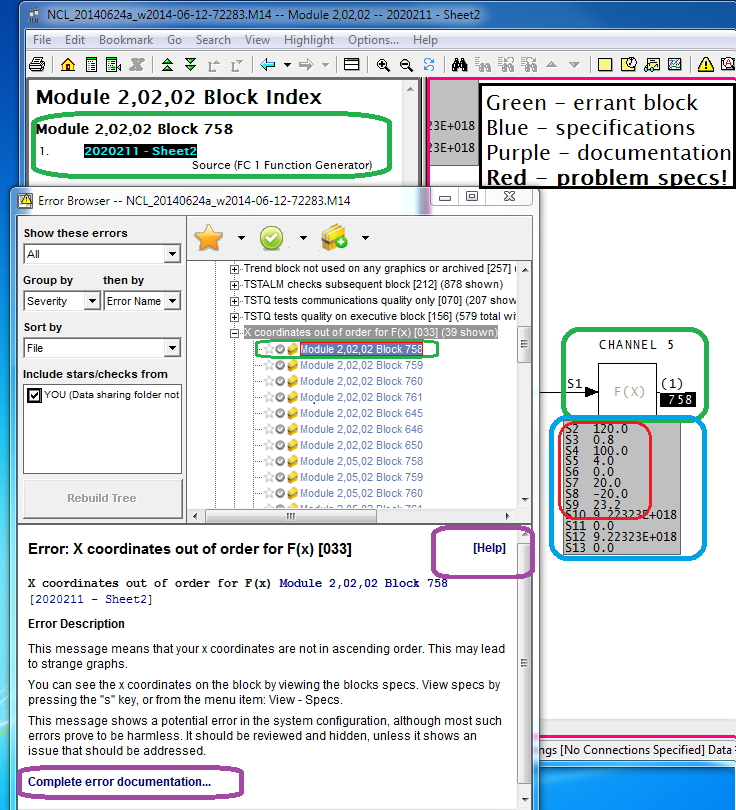
Click on the first "X coordinates out of order for F(x)" message. You will see both the message details in the lower panel of Error Browser, and the function generator block it pertains to on the CLD in the main browser window.
  • The block index shows that the F(x) block in question is used in only one place (that is, it is not imported anywhere else) [green].
  • Links to complete documentation of the message are available [purple].
  • The specifications [blue] are there to examine. The problem with the specifications [red] is evident. The X coordinates (even numbered specs) are decreasing, not increasing. This block will give an output of 0.8 for all inputs less than 120.0, and 23.2 for inputs more that 120.0. It doesn't work.
But you do not care, because the F(x) output is not used.  If it were used, there would be more than one entry in the Block Index.

Arrow down through all the error messages of this type, and all but one will turn out to be unused.


The F(x) block with "X coordinates out of order" that is actually used

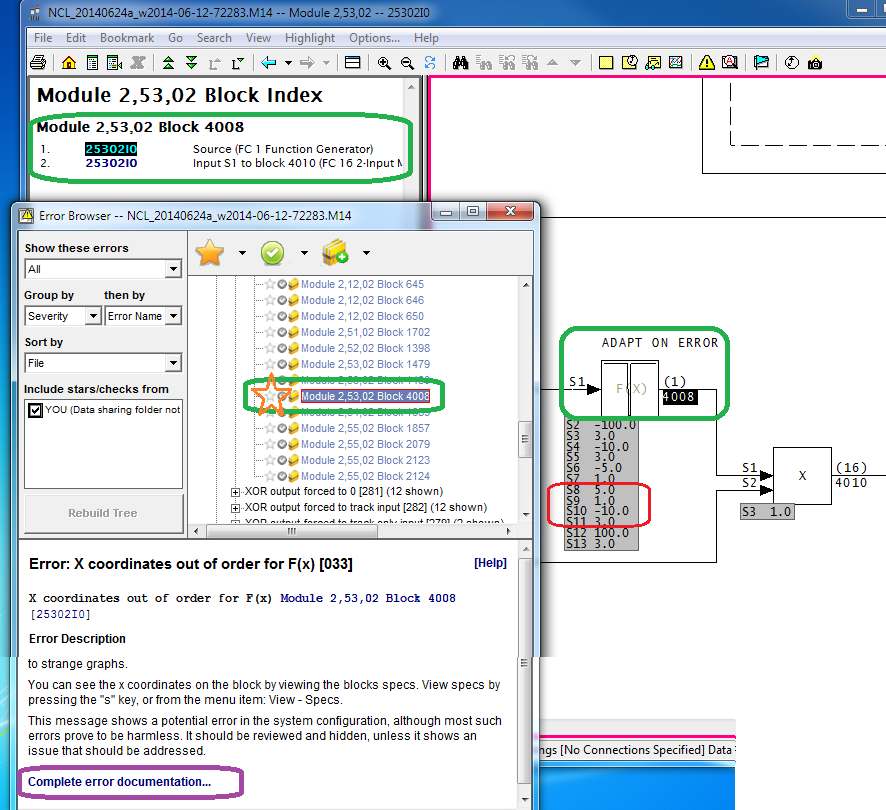
Only one block with this error is actually used in the process.  You can see (below) that it is used because more than one item (the block source, as well as its use) show up in the Block Index.

The output value is wrong in the input range from 5.0 to 10.0. Like the negative side, it is supposed to rise linearly from 1.0 at 5.0 to 3.0 at 10.0. Instead, the output jumps from 1.0 to 3.0 when the input reaches 5.0. Analysis of the logic using the FC 16 multiply block is needed to determine how adversely this will affect the process. However, if you consider that the output is 3.0 for all values of input other than from -10.0 to 10.0 (by design), it is clear that 25% of the design effect is missing. Furthermore, one can worry about the effect of the step function in the output, something that DBDOC also has flagged.
 
Click on the Star to mark the problem error. You can also Unhide it. Now you can Rebuild Tree, which shows up whenever the Error Browser presentation would change. I also changed to show "Active" errors instead of "All", which makes all the Hidden errors not show up in the tree.


What is the error? You must be curious by now.
 
The messed up number feeds an adapt block that affects the overall gain of an APID block controlling a tag called 2LIC-459 "GREEN OIL TOWER REFLUX DRUM". The error means that there is no gradual ramping of the overall gain from 1.0 to 3.0, which might be nasty. On the other hand, GREEN OIL TOWER might no longer be used at all, or perhaps never installed, or whatever. DBDOC makes it all as easy as A, B, C.
  • A - The Function Generator Block 4008 is flawed, making a step change in the value where it should be smoothly changing.  This feeds into Multiply Block 4010.
  • B - The bad output from Multiply Block 4010 is fed into the Adapt Block 4011.
  • C - The bad value is set into S11 of APID Block 4016.
  • D - As a result, APID Block 4016 has a step change in overall gain in part of its operating range.
  • E - The output signal generated will jump if the error (my guess) exceeds 5.0.
  • F - Control of 2LIC-459 will be dicier than it should be, because control signals will be more extreme than designed.


Displaying the actual F(x) Block function, with live data
 
As an aside, DBDOC will show you the actual F(x) Block function, with its live data (but not here, because I do not have the plant data). You turn it on by right-clicking the output block number [A]  and selecting the live function graph feature [B]. Double-click on the graph [C] to dismiss it.


Getting more information: Help links in the Error Browser
This is as good a place as any to mention the fully featured help that is built into Error Browser, from the purple highlights above.


Wednesday, August 6, 2014

Surprise! Your TSTALM Blocks may put random device drivers into override (or do even worse).

TSTALM blocks can easily be misconfigured when working logic is reused. The most common error is simply failing to change the input specification to get the status from a different block (i.e. S1 is accidentally left unchanged when the function block is copied and reused, and thus both old and new TSTALM test the old block, and nothing tests the new block). When this error is made, there are invariably two consequences:
  1. Action that is intended to be taken does not happen when it should.
  2. That very same action does happen when it should not.
This note analyzes just one of thirteen instances identified by DBDOC in a particular system where a TSTALM block tests a block that already has a TSTALM applied to it (in fact two of these errors are not a concern, because previous examination has shown that the incorrect action is not taken because the signals are unused).  The remaining eleven messages in fact indicate twenty actions that will not happen when they should, plus twenty places where the same action will happen when it should not.

Of course, a situation where a TSTALM block triggers one or more wrong actions, and where the designed TSTALM block fails to trigger the desired action, can be serious for any block type.

Example:

The TSTALM error is typically caused caused by the DCS worker failing to change specification S1 to match logic that is put onto a sheet and given new block numbers.  So the block is copied, but the TSTALM S1 is not changed to match the new block it is supposed to be testing.

Take a look at this image:


[A] Error Browser: Multiple TSTALM: Module 1,10,04 Block 3623 is tested multiple times

This error is selected in the error browser.  It indicates that more than one TSTALM block is testing Block 3623.  The Error Browser shows a total of thirteen errors of this type.
 
 
[B] TSTALM Block 3632 -- The working original
 
The MSDRVR (Block 3623) is being tested correctly for being in Auto or Manual because the TSTALM (Block 3632) shown has S1=3623, indicating that it tests MSDVDR Block 3623. 
 
 
[C] Intended action on block in Auto or Manual
If TSTALM (Block 3632) is put into Manual, its output at block 3633 will be 0. However, if TSTALM (Block 3632) is put into Auto, block 3633 will be set to 1.
 
 
[D] OR block with this result in it
 
Clearly documented "OVERRIDE TO DEFAULT", this action works in the prototype logic.  When TSTALM (Block 3632) is in Auto, the S25 override input into MSDRVR (Block 3623) will be set.
 
 
[E] The MSDRVR block Override input
 
The diagrammed MSDRVR (Block 3623) will be put into Override when it should be.
 
 
[F] Working action
 
Tag 1SLWHS806 "FLUSH WATER PUMP" will be put into Override if TSTALM (Block 3632) tests the  MSDRVR (Block 3623)as expected.
 
 
[G] Seven errors:  MSDRVR (Block 3623) is spuriously tested by SEVEN other TSTALM blocks.
 
The block index shows seven more TSTALM blocks responding to the status of tag 1SLWHS806 in a spurious and possibly dangerous fashion.
 
These seven  TSTALM blocks, each with their S1 set incorrectly to 3623, are displayed below.


Each of these seven TSTALM blocks will put some random MSDVDR into Override when the unrelated MSDRVR (Block 3623) is in Auto, and at the same time fail to put the expect block into Override when it should. 
 
Ramifications:
 
Some of the failed or unintended actions might be noticed. Others will not be until a problem arises. It is very likely that the cause of the sporadic operation will not be found if the problem actions or failed actions are noticed, because there is no expected logical connection between these unrelated blocks.

Wednesday, July 16, 2014

Your system depends on TSTQ to detect problems. Are these tests actually working?

I have taken the time to show and explain some of the many things that DBDOC checks for (and Composer does not). I believe there is no better tool for configuring INFI 90 than Composer, way ahead of WinCAD and DOS CADEWS. However, we have found that many errors exist "in the wild" and cannot stomach ignoring them.

One very common and pernicious error situation is when TSTQ blocks test the quality of signals that don't have quality. The test always succeeds, and this success allows whatever condition the test was designed to detect to go undetected. This is potentially dangerous, since the intention of some responsive action resulting from the detection of bad quality on a signal is silently thwarted.

To highlight problems of this sort, DBDOC checks to make sure that TSTQ block inputs actually can be bad quality, and reports errors when they are not. DBDOC also draws lines with quality in blue, making visual confirmation easy.

The following examples are from a system where DBDOC detected 82 instances of TSTQ being used to test signals without quality.

Overview:

In this first example, a signal called "LP EXT TO LP STM" is brought into the system to use in control. The TSTQ error found by DBDOC will cause bad quality on this signal to put part of the control loop into Manual, but leave part in Auto (not the designer's intention!).

Take a look at this image:


[A] Error message presented by DBDOC Error Browser

TSTQ 1SLPPC904@MI Module 1,02,02 Block 1668 tests Module 1,02,02 Block 1610 (FC 7), which does not have quality.

Clicking on the error in the Error Browser calls up the problem TSTQ block [1668].

[B] TSTQ block that is offending us

Input S1 is blue, showing that the signal can have bad quality. Input S2 is black, showing that the signal cannot carry quality ([E] on the second image shows where the quality was inadvertently stripped out).

[C] Intended action on bad quality of the second input

Bad quality is supposed to put the controller 1SLPPC904 "LP EXT PRESS CONT" in Manual Lock, but will not.

[D] Controller that is not handled correctly

Tag 1SLPPC904 "LP EXT PRESS CONT" will keep on in Auto, even if the input is bad.


As a contrast, here is a situation where bad quality is handled correctly, and will successfully trigger a controller to switch into manual.

[E] The Square Root function block that removes quality

The output of the square root block [1610], like all calculation and operation blocks, strips the quality attribute from the signal.

[F] Working action

Bad quality on the input correctly, with a 15 second delay, does cause an intended action.

[G] Intended action

After the delay, bad quality will put part of the control loop into Manual Lock.

[H] Controller that is handled correctly

Tag 1SLPFC904 "LP EXT TO LP STM HDR CONT" will be put into Manual if the input is bad.

Ramifications

Only 81 more of these TSTQ errors to analyze. Signals are never bad quality until they go bad quality. At that point, the plant is depending on the logic to protect it, and these error situations typically thwart the intent of the logic.

Friday, December 20, 2013

FC 222 and 223 Can Have Severe Exception Report Problems

Summary

If you have FC 222 and FC 223 blocks, you should check for the following problems:

  1. FC 222 S8 defaulted to 0.0 and FC 223 S9 defaulted to 0.0 which causes continuous exception reports if the block is tagged in any HMI.
  2. Spare FC 222 and FC 223 blocks tagged but not used which cause absolutely wasted continous exception reports.
  3. FC 222 and FC 223 blocks with all the significant change specifications set to 1, even when this value is not appropriate.

Details

At a client site, DBDOC was responsible for uncovering a significant loading problem involving FC 222 - Analog In/Channel that has been causing significant loading of the node communication capability. It turns out that FC 223 - Analog Out/Channel has the same problem. Here is an outline of the problem:
  • site has significant number of FC 222 S8 and FC 223 S9 blocks at default value of 0 significant change
  • even worse, many of these have "spare" tags identifying unused blocks brought into the HMI by exception report
  • the result is exception reports generated by the node at once per second, many utterly wasted, and the rest far too sensitive to be valid.
  • examination of other systems shows that some have all default values replaced, although there is clearly no understanding that the value is in engineering units (like FC 177) not in percent
DBDOC tools including the Significant Change Report and the extraction of all specifications made it easy to look for the problems once they were conceptualized.

In the site in question, a power plant installation, the bulk of the FC 222 blocks were done relatively recently, taking advantage of modern INFI 90 hardware.

There are 573 FC 222 blocks with default significant change of 0. Our tests with DBDOC Watch Window easily proved that each of these blocks, either if imported or in the HMI tag database, generated an exception report every Tmin seconds, that is, every second. In fact, 92 more FC 222 blocks had non-default significant change, because they had been properly configured.

What about these 665 FC 222 and FC 223 blocks?
  • One had no tag, but was imported by an AI/L block, so it is generating an exception report anyhow.
  • 196 were named spare blocks, none used in graphics or PI, so196 XR's per second wasted.
  • The other 469 blocks were giving an XR every second.
The PCU distribution of the load was:
  • PCU 2 - 640
  • PCU 3 - 16
  • PCU 4 - 8
  • PCU 5 - 1
There actually were 2181 tags defined in PCU 2, which means that every Tmax of 60 seconds, each generated an XR. Thus, the base XR load was:
  • 573 per second from default FC 222 blocks
  • (2181 - 573) / 60 = 27 per second from the other tags
That is, the base XR load on the node is 600 XRs per second. It is a good thing this system has NIS 21 / NIS 22 communication cards. As it is, this showed that the average communication CPU usage in the node of about 50% was a valid figure.

Why worry about this?

554 of the 640 tags and export blocks had default significant change. If the defaulted FC 222 blocks had 1% significant change, the base load would nominally be 2181 / 60 sec or 36 XRs / sec. Allocating 600 XRs per second nominally would allow the analog tags to be increased in sensitivity by a factor of 20, with less load on the system than there is now.

This investigation also brought our attention to FC 223, the Analog Out/Channel block, which also has a default significant change of 0.

Guess what? There are 80 of these in PCU 2. They all have the default 0 significant change, so they are generating 1 exception report per second. 31 of them are spare blocks, so that load is doing nothing.
Bottom line is that, unbeknownst to our client, the exception report loading on the node included:
  • 96 analog in and 31 analog out spares giving 127 utterly wasted XRs per second
  • 469 analog in and 49 analog out tagged blocks giving 518 very, very, precise values every second.
  • 26 XRs per second from the other 1536 "low class" tags, most at default significant change.
Thus, the load was about 600 XRs per second. If the spare tags were deleted and the defaulted ones set to 1% significant change, the load would be 518 / 60 per second (typically) or 9.

This node would generate 35 XRs per second as currently tuned. There is lots of XR capability to improve its tags and history data using the capacity that is nearly completely wasted right now.

How many other nodes with FC 222 and FC 223 blocks have this bad situation?

The good:
  • Large Australian power plant has 10663. One has default significant change. It is also not tagged.
  • Large Canadian power plant has 1610. None of the 161 that have 0 significant change is tagged.
  • Large American power plant has 1312, none of which is defaulted.
  • Medium size Canadian power plant has 192, all with sig change set to 1.
The bad:
  • Large Australian process plant has 66 with default values. 16 are tagged, which is a meaningful load.
The ugly:
  • These small American power plants with all values defaulted at 0 and over one-third tagged but spare.
  • Small American power plant with 88 of 754 with default 0. 86 of these have tags, so they are a load. 21 are spares, so they are a wasted load.
  • Medium size Canadian process plant has 496, all at default 0. 216 are in PCU 171 and 280 in PCU 172. Every one is generating one XR per second.
  • Medium size American process plant has 559 FC 222, of which 368 are tagged with significant change 0. No spare ones are tagged.
It is clear that the significant change specifications and tags for all FC 222 and FC 223 blocks should be examined. The load can be large, and it can be a waste of a precious resource, even stalling or losing exception reports.

Postscript

The general situation with FC 222 and FC 223 blocks that are not defaulted is to have the significant change specification set to 1, no matter what the span.  This is probably an error, too, suggesting that the work was done under the misconception that the specification is a percentage value, rather than an EU one.  1 in a span of 5 is 20%, whereas 1 in a span of 1000 is 0.1%.  Since both appeared in the same system, with the only value used being 1, it is likely the values should be studied even when they are all not defaulted.

Tuesday, November 12, 2013

Error example: The case of the not quite identical clones.

This is the story of one error in a system with two approximately cloned units.
 
The error message is simple.  It says that a FC 36 8 input qualified or (QOR) block does not have enough inputs wired to be able to trigger a "1".
 
Image 1 shows the following DBDOC aspects of the error message, starting from the Error Browser.
  • A - The error is selected in the Error Browser.  Note it is the only error of this type.
  • B - Clicking on it brings up the detailed description, plus the location on the sheet where the error is found (Image 2).
  • C - Note how Error Browser makes new detailed error documentation available to the user.
  • D - The documentation called up by asking for "Complete error documentation".
  • E - The documentation showing explanation and example (not from this system, of course).
Image 1
  
Image 2 shows how Error Browser brought up the flagged block in the sheet.
  • F - The block number is highlighted, and the block index available to show where it is used.
  • G - The specifications show S9 is 8.  With only 6 inputs, the output can never be 1.
Note, however, that this is a clone of another unit, which did not have the error. 
  • H - The text of the reference on this output, which we can search for in the other unit.
Image 2
 
Image 3 shows how Hyperview text searching finds the reference text to resolve this question.
  • I - Search for the (case insensitive) text of the reference on the sheet with the error.
  • J - Go to the result in the first unit.
  • K - Here is what you find.
  • L - The logic in the first unit was originally a rung block - FC 111.  
Image 3
 
The error, it turns out, was introduced when the rung block was changed into AND logic implemented with the FC 36 block, but incorrectly.  There is a good reason not to have cloned errors. 
 
Cloning is beautiful - it replicates tested, working logic.  When a message or error is noted, it would be expected to be in all similar instances.  If a message is not replicated, it can mean:
  1. the error was fixed in another copy
  2. the error has not yet been made in the other copy
  3. the copy is not an exact clone
The error in this example is in the third category, logic that is not exactly the same in the clone.  Watch out for situations like this!