Showing posts with label PG2. Show all posts

Monday, May 2, 2022

DBDOC 11.3 -- Ready to download!

DBDOC 11.3 is an important release that revamps the basic Hyperview interface, provides notably improved support for SPO and 800xA/PG2 graphics, enhanced integration of SPE 2.x, improved AutoCAD and MicroStation support, and live data reliability improvements. It also contains the prototype release of Hyperview in A Browser.

Download DBDOC 11.3 Here
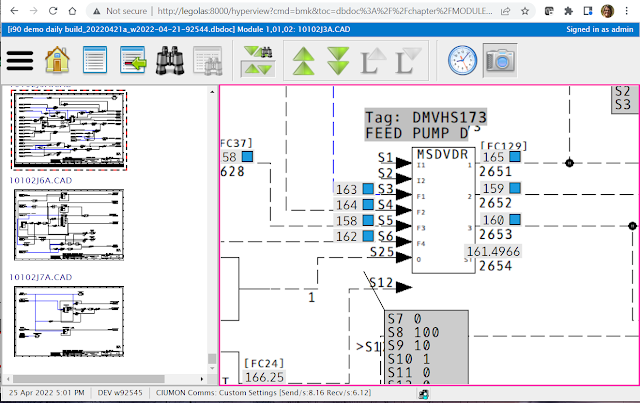
New Hyperview navigation & hotspot interaction.

  • Hyperview now supports a “drag-pan” and “scroll-zoom” as its default interface, for better usability and compatibility with a touch-screen context.
  • Hotspots highlight interactively when you mouse over them.

Improvements to error browser, search & thumbnail support.

  • Errors can now be grouped by file type, including graphics type.
  • Context of surrounding words for search hits can now be displayed.
  • Thumbnails can be enabled separately for CAD/CLDs and general graphics.

Powerful new support for SPO and SPE 2.x systems.

  • BuildPlus “automagically” detects and builds the most recent version of time/date stamped data for SPO SPlus Operations Databases and SPE 2.x Backups, without the need to rename and copy these files
  • In many cases SPE 2.x can be now integrated automatically by BuildPlus without requiring an SPE backup at all.

Improved graphics support.

  • Ongoing improvements to hotspot placement, live data, fonts and colors in SPO graphics.
  • Many improvements to 800xA/PG2 graphics, including better hotspot placement, split Auto/Manual and Cascade/Ratio hotspots, more live data hotspots.

Improved AutoCAD & MicroStation support.

  • Support for AutoCAD ODA 21.11
  • Proper handling of MicroStation files with unicode names.

Live data reliability.

  • Ongoing improvements to Relay and Collector modes.
  • Data fetches are suppressed for the relevant block when certain HOPC errors are encountered, preventing stalls.

Hyperview in a Browser initial release

  • Hyperview in a Browser prototype release: Hyperview’s basic functionality in a touch-screen friendly web browser framework, suitable for tablets over wifi on your LAN, and most browsers on any networked machine.
  • Hyperview in a Browser supports basic navigation, search, and live data.
  • Hyperview in a Browser works on desktop and tablets, in Edge, Chrome, Safari, and Firefox, in all versions and platforms more recent than October 2017.
Give us a call if you would like to try out Hyperview in a Browser! It's not hard to set up, and we can walk you through it.  There is documentation here. 


Friday, December 9, 2016

DBDOC 10.7 -- Download Your DBDOC Update Today!

We are delighted to announce the release of DBDOC 10.7, with a variety of upgrades, bug fixes, and new features.  A few of the major improvements are noted below.  For more information, please see What's New and the Release Notes.

Built-In PDF Files


If your system contains PDF file documentation, you will be happy to learn that PDFs are now first-class citizens in DBDOC, built directly into the M14 like other document types.  They can be viewed right inside of Hyperview, links to blocks and tag references are made automatically, and they can be searched like other documents.

Links to external PDF documentation are still supported, too.

See Built-In PDF Files and More! PDF File Support in DBDOC 10.7 for more information.

Configuration Change History Support


DBDOC 10.6.1 introduced the creation of DMPCFG files for both the .CFG files and the CLD and CAD sheets automatically when you do a DBDOC build.   DBDOC 10.7 introduces automatic archiving of the files from both the CLD / CAD sheets and the compiled or saved CFG files. When you do your DBDOC build, your DMPCFG files will now be archived with the error files. Also, the last build you did before installing 10.7 will be archived. Thus, you will start with a base for comparison of the last build you did with DBDOC 10.6.1 and the first with DBDOC 10.7.

See Configuration Change History Support in DBDOC 10.7 for more information.

Improved S+ and 800xA PG2 Graphics and MicroStation Drawings.


Display of S+ graphics has been significantly improved. Symphony Plus graphics rendering has been greatly improved. Splines, background colors, lines, etc. which previously were not drawn, now appear, and previously handled elements are now drawn more accurately.  The user can now also specify the path to their Symphony Plus image files in Wizard so that Hyperlink can find and use the correct image specified in a graphic. S+ and 800xA live data display sizing has also been improved. MicroStation drawings have improved text display, rendering and remove duplicate search hits.

Improved Error Detection


Processing has been extended to check more blocks for continuous exception reports.  The use of PID and APID blocks with derivative gain combined with inputs from discontinuous input blocks is reported.


"Lost Project" Recovery

DBDOC 10.7 can recover "lost" projects. A feature to recover "lost" projects has been added to BuildPlus, allowing project recovery if are inadvertently "lost" due to a change in UAC level on a machine or a user's privilege level.

There's more...


For more information, please see What's New and the Release Notes, or follow this blog, where we will be illustrating new features and DBDOC capabilities regularly.


Friday, January 29, 2016

DBDOC 10.6.1— Ready for Download

DBDOC 10.6.1 is now available. Download it here.  There are major improvements to usability in a couple of areas, new features, new error checking and a variety of minor fixes and additional conveniences for users.

Read on for a quick overview of some of the highlights of DBDOC 10.6.1, or see the complete release notes here.

Watch Window Performance & Usability


As we gain experience with Watch Window use patterns, we are honing this tool to better meet the needs of the most prolific users.  There are some important improvements in this release that greatly improve Watch Window performance and responsiveness in highly loaded situations with groups containing large numbers of blocks.  In addition, the ability to hide and restore entire Watch Window groups has been added.  This allows you to define and configure a group, and set it aside so that it doesn't clutter up the interface when it's not needed.  It can be restored (with all of its setup) at any time.  Last, but not least, there is now a command line switch for specifying default date format in the Watch Window, so that if you are DDMM, you don't have to look at MMDD.


HTML Support (Available in the International Version)


We have been moving the Hyperview browser toward full Unicode support in all documents for some time now.  Unicode characters are supported on graphics and most Hyperview tools. The last step in the journey is the complete implementation of HTML-based Hyperview text display.  This support is substantially enhanced in DBDOC 10.6.1: documents are more faster, scroll better, behave better, and there have been numerous small improvements. HTML support will continue to be expanded in upcoming releases.


New Feature: Detect Module Load Changes

A major new feature involves the creation of .dmpcfg files, text dumps of CFG files from the project and the same information from the DBDOC compile. They allow comparison of current and historical module load images. If you archive the files, you will be able to analyze specification and logic changes over whatever time intervals you choose. This feature applies both the the CLD / CAD logic and the compiled CFG files.

New Errors Detected


Some new error types are now detected by DBDOC, and viewable in the Error Browser.  Errors are reported for non-functioning lead/lag, rate limiter and integrator blocks. Duplicate local OREFs are also now flagged, as they can cause a problem for Composer and WinCAD. Segment control blocks are checked for violations. The most important checking involves reports on numerous violations of the limits on specifications. Fully two-thirds of sites we checked had such errors.


And More...

  • Numerous improvements have been made in handling S+ and 800xA graphics, including support for the Welcome_dall graphic and for the SetFont function.
  • Support for AutoCAD 2016 is now included.
  • Support for the 2015 single­ volume function code manual and other two volume versions has been added.
  • Top level symbol locations are now shown in the Audit Window for Conductor NT and PPB.
See the 10.6.1 Release Notes for information on the many upgrades and improvements in DBDOC 10.6.1

Download DBDOC 10.6.1

Wednesday, August 26, 2015

Announcing DBDOC 10.6

We're delighted to announce that DBDOC 10.6 is now available for download, with major usability improvements, new subsystem support, and of course bug fixes and general enhancements. 

Read on to learn more about some of DBDOC's new features and capabilities.

Error Markers

In Hyperview, you will notice the new error markers right away, flagging locations on documents where DBDOC has detected a possible error situation.


Mouse over a marker to see the detailed error message.  Double click on the marker to bring up the error browser with full error information. 


You may see error markers that turn out to be flagging harmless situations. If this is the case, just hide the error (or category of errors) in the error browser, and set it to display only "Active" (i.e. non-hidden) errors. The error marker will no longer show up on your document.

Watch Window Navigation Plot 

Managing large datasets in the Watch Window has become much easier with the introduction of the "navigation plot".  This is a birds-eye view of all the data collected in a plot, with a draggable frame showing the part of the plot visible in the main plot area, essentially a graphical scrollbar.  Just drag the frame to view different data collection runs.
 
In addition, there are now automatic markers inserted at the beginning and end of every data run (indicated by small green or flag flags on the plot).  You can jump from marker to marker using the new "Data Run Marker Navigation" buttons below the plot.


No More Missing Lines*

* with minor caveats (see below).

Users of Hyperview on remote desktops and certain other situations will be happy to learn that the issue of "missing lines" on CAD sheets and the like has been sorted out once and for all (except for on Win NT 6.0 platforms Windows Server 2008 and Vista, which have different underlying graphics support -- we are still working on those).  If missing lines affect you, most likely in a remote desktop context, switch to the GDI+ graphics library in the View tab of the Options dialog.

Do your lines look like this?
 
Enable GDI+ to fix them.
 

Copy Text from Graphics

For the first time, DBDOC supports the right-click copying and pasting of text from graphics or CAD/CLDs.  You can also directly search the project or the help for text obtained in this manner.


Function Block Hotspots

For the first time, function blocks on configuration diagrams are live "hotspots".  Use them to add all the inputs and outputs for a function block at once to the Watch Window.


Bookmark Sharing

We are continuing to create support for user data sharing in Hyperview. In the last release we enabled the sharing of error information, so groups could collaborate on analyzing and reviewing errors.  Clearly the sharing of error data itself is highly desirable, and we are considering approaches.

In the meantime, bookmark sharing has been added to Hyperview.  No more copying and importing of bookmark files -- simply share them directly and interactively. You will see shared bookmarks right in your bookmarks list.


Chinese, PGP, and PG2

DBDOC 10.6 continues to expand the file types and subsystems supported. Most notably, Chinese language support for Composer and PGP graphics is now implemented (read more). Full HTML text support is on its way. General support for PGP and PG2 graphics has been improved in many ways.


Sibling Projects

DBDOC 10.6 introduces the concept of  "Sibling Projects," a major new capability.  Basically, if you have a huge system, you can break it up into sub-projects, and build each one with the configuration information from the other "sibling" projects, without including all the associated documents and graphics.  So you can get most of the benefit of DBDOC's connection analysis while keeping individual builds to a manageable size (and build time).   Learn more about sibling projects here.

CIUMon Configuration Manager

CIUMon supports more options and run modes with each passing year.  Ports and protocols, collector or relay, logging and statistics: once you have set up a configuration, you won't want to lose it.  Keep track of CIUMon configurations more easily than ever with the new CIUMON Configuration Manager, which makes it easy to store, filter, and retrieve configurations.


These are some of the new features you will encounter in DBDOC 10.6.  We would love your feedback, and to hear your suggestions for improvements in the next release.


Wednesday, September 10, 2014

DBDOC 10.5.1: What's in it?

DBDOC 10.5.1 has made its appearance this summer, with some major updates to our support for SPlus and PGP graphics, as well as completely reworked 800xA support.  Database tag records are now much clearer and complete than ever before.  And with the addition of Error Data Sharing, the first example of data sharing support for Hyperview users is now complete.


Improved Database Tag Records

One of the first changes you might notice upon upgrading to DBDOC 10.5.1 (download here), is the completely reworked presentation of database tag records in the Hyperview browser.

For historical reasons, tag records displayed in Hyperview used to look like this:
 
 
And now they look like this, which is a lot easier to read:


Complete Tag Information from Operate IT and SPlus

In addition, ALL data is now extracted from Operate IT (PPB and 800xA) XML database files, and are now be usefully displayed (and searchable) within DBDOC.  Previously only a limited subset of tag attributes was extracted by DBDOC and presented in the Hyperview browser.

Before:


After:


Error Sharing
 
Another change you might notice, if you were introduced to the Error Browser in the last release, is the appearance of a new checkbox list on the left hand side of the browser window.  This is a list of users on your system who are sharing their error stars and checks, which you can choose to display in your Error Browser.  This makes it easy to review errors collaboratively.   It is planned for future releases to include shared bookmarks, annotations, Watch Window groups, and Watch Window data.  


To participate in error data sharing, use the new Sharing tab of the Options dialog to register for sharing in a specified Shared Data Folder.  Usually the name of the Shared Data Folder will be supplied in the project file, so all you have to do to start sharing is hit OK to register.


Extended Support for SPlus and PGP Graphics
 
If you have SPlus or PGP graphics, you will notice substantial developments in DBDOC's support for these formats.  Support has been extended past the initial support of systems converted from Conductor VMS systems to include consoles converted from Conductor NT and Process Portal B. Live controller data has been added.


Extended and Reworked Support for 800xA Graphics

The support for 800xA has been completely reworked to make use of data extracted by programs from Assistance Système LD Inc. (ASSYST) giving better images, access to controller data and text searching on graphics, and eliminating the numbers and arrows seen in earlier versions using the previous approach to extracting these graphics for DBDOC.


Other Updates

In addition to the major developments described above, 10.5.1 delivers plenty of minor bug fixes and
improvements.  More DBDOC error types have now been converted to display in the Error Browser.  Live data (notably in the Watch Window) can now be requested every 100ms.  Go To Use right-click navigation in Hyperview now places system uses before DBDOC generated documents.  Timestamp labels can now be hidden in the Watch Window.   CIUMon logging has been improved in many ways.  Command line support for importing DBDOC projects has been implemented, making it much easier to migrate the DBDOC build system to a new computer.  And many more small changes which you may or may not encounter but which increase DBDOC's robustness and usefulness in specific situations.

If you haven't already, take a moment to download DBDOC 10.5.1 and upgrade your system.


Wednesday, June 11, 2014

Coming soon: DBDOC 10.5.1, with NEW error sharing and improved SPlus/PGP and PG2 support

We're now in the home stretch for getting the next DBDOC release out the door.  DBDOC 10.5.1 includes major expansion of some of the new features introduced in DBDOC 10.5, as well as general bug fixes and feature improvements

There is good news for users of SPlus/PGP graphics.  As we receive feedback and gain experience from client systems using DBDOC 10.5,  support continues to be solidified, especially for systems converted from PPB and Conductor NT.

In addition, there is a whole new approach to 800xA graphics.  Using tools created for DBDOC by  ASSYST (included with your DBDOC installation) it's easy to extract more comprehensive PG2 or VB data for better integration of 800xA graphics into the DBDOC snapshot.

The other major new feature for DBDOC 10.5.1 is the introduction of error sharing.  Really this is just the first step along the road of allowing Hyperview users to share data in general.  Right now, each Hyperview user is relatively isolated, making independent annotation notes on projects, bookmarking significant items, creating and configuring Watch Window groups, and, as of DBDOC 10.5, managing and reviewing system errors in the new Error Browser.  The vision, however, is for all these activities to become more collaborative.  A whole group could take advantage of a predefined set of bookmarks, or view notes made by others.  It takes time to set up Watch Window groups, configured appropriately for monitoring particular situations.  Ideally these groups (and the data collected in them) could be easily shared among multiple users if desired.

So this is the direction Hyperview is heading, and the first example of this sort of sharing actually implemented is the sharing of error information, i.e. the stars and checks added to errors displayed in the Error Browser.

User data is shared via a shared folder accessible to multiple Hyperview users.  Usually this folder will be specified in BuildPlus, when a project is built, and will show up automatically in Hyperview.  To start sharing data with other users, all you need to do is "register" in this shared data folder.  Go to the Options menu in Hyperview, choose the Sharing tab, and (if a shared data folder has been built into your M14), just hit Apply and you're done.  If not, you can manually choose a data sharing folder.


When you open the Error Browser in 10.5.1, you will notice a new list on the left, listing all the users that have registered to share their error information.

 
By checking and the boxes next to the names of other users, you can cause their stars and checks to be displayed in your Error Browser.   By setting various filtering options, you have control over which errors you display.  For example, you could display only the errors starred or reviewed by a particular user.  Once the errors are displayed, you could select them all (for example) and hide them, or mark them as reviewed yourself.
 
This functionality is simple but powerful, because for the first time, it really makes it easy and convenient for groups of users to collaboratively review and manage errors.  A typical system will have hundreds of build errors, many of which are not serious in context, but all of which should be reviewed for safety.  The ability to split up and coordinate this error review process is extremely useful, and was requested by a number of early Error Browser users.
 
DBDOC 10.5.1 will be released and available within the next few weeks.  For an early look at the new features still under test, you can download DBDOC 10.5.1 Beta from the GMCL website.


Friday, October 25, 2013

Thoughts on 10.5

The most important feature in DBDOC 10.5 for everyone with INFI 90 is the Error Browser. We continue to find issues that cannot be found any other way, as we have done for the past seventeen years. Now, finally, we let the user examine, comprehend and resolve our messages. You will hide many, but mark some for attention. When you rebuild the DBDOC document, new issues will be highlighted. Things you have hidden will stay hidden. Finally, you can converge to a system with no significant errors.

We continue our search for a system with more than 200 sheets that has no errors worth fixing. So far, only systems that have used DBDOC and heeded our messages are even close.

AutoCAD 2012 is now supported as well as previous versions. XLS file support has been extended to handle more and wider columns.

Of course, we finally have released initial support for ABB SPlus Graphics, 800xA PG2 and IET800 CIU. You will still get the most data out of your INFI 90 system for DBDOC with the least load out using a conventional CIU with RoviSys OPC90Server Turbo. An unprecedented 100 values per second at 10 GMI fetches can be achieved.

Friday, October 18, 2013

DBDOC 10.5 is ready to go!

I'm happy to report that we are finally in the process of actually burning DBDOC 10.5 DVDs at the office, so if you're expecting one, it should be arriving soon.  This release has been a long haul, but it contains some very interesting new features (along with plenty of general improvements and bug fixes as usual).

If you need it RIGHT NOW, you can download DBDOC 10.5 here.

DBDOC 10.5 contains beta-level support for PGP, SPlus and 800xA PG2 systems.  These are in the final stages of testing and integration, and will be added to the official release version in November.  If you have one of these systems, and would like to test drive this support before then, let us know.  We implement the support for these systems substantially by reverse engineering example files from clients, so the more trial users we have, the sooner our support will become complete.

Another major new feature in 10.5 is the Error Browser.  For the first time, the configuration errors identified by DBDOC while compiling a project file can be presented interactively by the Hyperview browser.  Although this error information has always been generated during builds, previously the only way of getting at it was to manually search the error text files produced, or build them into the M14 directly with a second build pass, a somewhat unwieldy method. 

In any case, there was no particularly easy way for the uninitiated to identify errors of interest and hide the irrelevant ones.

All this has now changed.   The Error Browser not only makes it easy to organize errors in a variety of useful ways (by severity, by document, by subsystem, by module, just to name a few), but also to flag errors, explicitly mark them as having been reviewed, and hide errors or entire categories of errors when they are not of interest.  The errors presented in the Error Browser link to specific location in the main project file, and there is built in error documentation to make the task of sorting and evaluating errors as easy as possible.

With this initial version of the Error Browser, individual users will be able to mark off errors for themselves, but shared error review is planned for the next DBDOC release.  It will then be possible for multiple users to collectively review and hide errors.

Other new features in 10.5 will be explored in upcoming posts.  Check out the official "What's New" document for an overview.