Thursday, February 25, 2021

Presenting DBDOC 11.2 Feature Update!

DBDOC depends on feedback from you, our clients, to provide better and better support for graphics and other system features, as well as support for the ways you actually use DBDOC.

DBDOC 11.2 Feature Update is an improvement on DBDOC 11.2 that addresses issues that came to light as 11.2 was used in the field over the past few months.  If you are upgrading, DBDOC 11.2 Feature Update is now the preferred upgrade version, and is available here.  

What does 11.2 Feature Update add to 11.2?

Improved S+ Support

Most significantly, your feedback on DBDOC 11.2 has provided enough information to make a number of improvements to our support for SPlus graphics, such as the following: 
  • Direct links to Station block PV, SP and MA blocks in more instances
  • Handling duplicate column names in SPO tag database file
  • Numerous places where appearance is improved in SPO graphics
  • Elimination of many unnecessary live-value hotspots
Please continue to let us know when you see issues with your graphics, text, or hotspot placement.  DBDOC's graphics support involves a fair amount of reverse engineering, and we are constantly learning more about the file formats we are supporting.

@Values like Set Point (SP) and Process Value (PV) on SPlus graphics were erroneously linking to the base Station Block, instead of the appropriate SP or PV blocks.  This is corrected in 11.2 Feature Update.


Live Specs on Ladder

In another area, in response to client feedback, Hyperview has added full support for the "new" live specs on ladder diagrams (not just CAD/CLD diagrams).   Prior to DBDOC 11.1, live specs were implemented as a form of live loop annotation, but this could be a highly inefficient use of live data bandwidth, as almost never changing specs were fetched as often as other sorts of live data.  In DBDOC 11.1, specs were integrated with layered specs, and comparisons between live and static specs were automated (read more here).  However, on our first pass, we missed adding this feature to ladder diagrams.   This has now been corrected, and clients with ladder diagrams can now enjoy full-featured and bandwidth-efficient live specs.

Press S on Ladder Diagrams to show integrated live specs, automatically highlighting discrepancies between live and static values on wired inputs and other specs.


Working CIUMON Interaction with ABB HAOPC

Several clients encountered a problem where CIUMON was found to be receiving data only once every 10 seconds from HAOPC.  This has now was fixed and has been subsequently verified in three different client systems.

Documentation for Custom Function Codes

11.2 Feature Update generates automatic documentation of the inputs, outputs, and specifications of custom function code blocks.


In addition a variety of other minor fixes and additions are included in DBDOC 11.2 Feature Update.   Please contact support @ gmcl.com if you have any questions about what has changed.  It's entirely possible that issues you have seen in earlier versions are now fixed, and if not, we want to know!


Friday, January 15, 2021

New Visual Signal Tracing Features: Signal ID, Quality Info, Input Trees, Output Trees


With DBDOC 11.2, Hyperview has added a number of interesting visual features on configuration diagrams that should make signal tracing even more intuitive. 

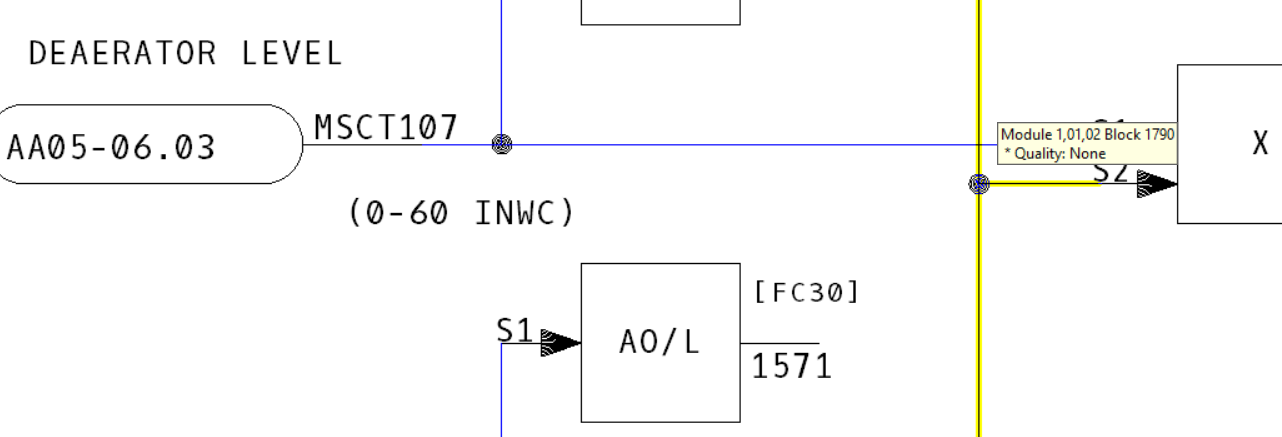
You've probably noticed the first new feature.  Now, when you mouse over a signal line on a CAD/CLD, it highlights and shows a tooltip with the block number and the quality type of the signal.  This is handy for quickly decoding a visual rat's nest of signals.

Hovering the mouse over a signal line highlights it in yellow.

If you want a better look, simply click on the signal line.  The highlight will "stick".

The line is now sticky-highlighted in orange.


Input Trees

You can visually display the "tree" of inputs for a block by right-clicking on a function block and choosing "Show Input Tree For This Block".  All the signals leading into the block and their ancestors are highlighted in red.


From a function block's context menu, you can display the input tree for a block.

If you trace the signal onto another sheet via the IREF, the input tree highlight continues on the adjacent CAD/CLD.  


Of course, it depends on the particulars whether this sort of visual signal tracing is helpful.  Many configuration diagrams contain feedback loops, causing virtually every block on the sheet to become highlighted.  

If an IREF is connected to an OREF on the same sheet, both will be highlighted, of course.

Here, for example, the input tree for Block 4109 has been shown.

Input signal tree for Block 4109.

Zooming out, we can see that an OREF is highlighted, as well as a number of IREFs.


Luckily, it is quick and easy to see why.  Hovering the OREF signal shows that it is in fact the identical signal that comes in the IREF in the lower left of the diagram.

The yellow highlight shows that both the OREF and IREF are connected to Block 4219.


Output Trees

Output trees can be displayed in the same way, and are shown in green.


Both input and output trees can be shown at the same time, for different blocks, or the same block.


Note: It's worth knowing that the input or out signal tree is calculated "on the fly," when you load a document.  Most of these trees would be very large indeed, if they were computed in totality for the entire system.  This "on the fly" tree building should not affect you if you are physically tracing signals from sheet to adjacent sheet, but if you "skipped ahead" without going through connecting sheets, lines would not be highlighted, even if they were in fact ultimately in the ancestor or descendant tree of the root block.


Quality

The new line information also gives you more information about signal quality.   Of course, you can already see if a line has quality, based on whether it is black or blue. 

Block 1790 is black, and has no quality.


Block 1790 is 133 is blue, and has PROCESS quality.

And this signal coming in from a DI/B block has PROCESS, COMMS, and IMPORT quality.

We hope you find this extra visual support for DBDOC's signal tracing capabilities handy.  Let us know what you think!

Thursday, October 22, 2020

DBDOC 11.2 is ready to go!

We're excited to release DBDOC 11.2!  This version really capitalizes on the groundwork laid in DBDOC 11.0 and 11.1 to present some game changing new features. 

Hyperview has thumbnail images in indexes.

Thumbnail images can now be shown in the indexes for all graphical document types. Thumbnails are generated when the dbdoc file is built, and are cached on the build machine.


Hyperview highlights signal lines and show input/output trees.

Mousing over a signal line on a CAD/CLD sheet now causes it to be highlighted, with a tooltip showing block number and signal quality.   You can now have Hyperview display the trees of input and output signals for any block.


Latest ABB versions supported

Supported ABB software versions include SPE 2.3, SPO 3.2, 800xA PG2 6.0, GPI, HPG, HGS.

BuildPlus has a new look, and new features.

BuildPlus icons have been updated, and toolbar buttons rearranged for clarity.


A new interface makes it easier to manage your DBDOC license.

Graphics and document support has been extended.

Extensive improvements have been made to SPlus graphics support, in the areas of live data hotspots, formatting, tags, fonts, and colors.  Extensive improvements have been made to 800xA PG2 support, in the areas of searchable text, dynamic bars, pseudotags, and graphics rendering.

There are improved automatically generated links on PDF files, and JPG images are now supported in AutoCAD drawings.

Other system changes

Software license keys are now supported, custom Function Code Support(Composer 6.5 S+ Engineering 1.3) has been added, and support for PG2 XLS (800xA Display Documentation) files has been removed.

Live data improvements

A new indicator in CIUMonController shows whether a CIUMon is able to provide data.  In addition, CIUMon can now recover automatically when RoviSys OPC90 temporarily hangs.

And much more!

You will find these updates, and many more bug-fixes and improvements in DBDOC 11.2
See the full Release Notes for further information on DBDOC 11.2 and prior versions.

Friday, May 8, 2020

Accelerate your live data with RoviSys Turbo!


Whether or not you have DBDOC, your INFI 90® System can use RoviSys Turbo. RoviSys Turbo makes DBDOC live data five to ten times faster. Composer alone is typically ten times faster when monitoring. There is no extra communication loading.

How does it work? RoviSys is the first to make use of capability in the CIU and IET800 to fetch up to 16 analogs or 16 digitals in a single GMI fetch. Setting up your IET800 with OPC90 to gain the advantages of turbo polling is straightforward and uses standard ABB parts. 

10x faster with no extra load!

RoviSys Turbo gets up to 16 analog or digital values from a module in one message, improving monitoring significantly at no extra communications load.

Put spare CIUs to good use

RoviSys Turbo can handle multiple CIUs and IET800s - serial, SCSI and ethernet. Make use of spare CIUs by providing added cabability for power users, or increasing the amount of data fetched.

Share a CIU or IET800

Use what you’ve got! RoviSys Turbo can support Composer and DBDOC at the same time using one CIU or IET800. Composer is given priority over DBDOC, while DBDOC makes good use of the CIU when available.

Try RoviSys Turbo!

Accelerate today! Visit gmcl.com or rovisys.com for more information and start your free trial of RoviSys Turbo.


Friday, December 20, 2019

DBDOC 11: Now Fully in the 21st Century

Ancient history...

When DBDOC was created in 1996, the world was a different place. The internet was in its early stages, and CD-ROMs were the latest and greatest. The task we were trying to accomplish with DBDOC was daunting -- document huge systems and make them fully searchable and cross-linked. We found MediaView, created for Microsoft Encarta, which long ago passed into the mists of time. The first version of DBDOC was constructed on the scaffolding of the MediaView system, originally intended to power multiple CD-ROM encyclopedias and the like.


Over the years DBDOC has gradually reduced its dependence on this core, while adding custom tools such as the Audit Window, Cross Reference utility, Watch Window, Error Browser and more.

Finally, with DBDOC 11.0, we decided to eliminate the dependence on a system created for Windows 3.1, as well as eliminate the significant limitations, weaknesses and quirks we had been working around for two decades. After all, one day, the old programs simply would stop working.

This required a complete overhaul of the internals of DBDOC, recreating functionality that had been provided by the venerable old MediaView framework. This was a significant challenge, but you will see immediate benefits. Moreover, DBDOC is now on a much better footing for new development moving forward. We no longer depend on components last touched in 1995!  Do you remember Windows 95, 98, NT4, 2000 and XP? They all have come and gone in the time DBDOC has been serving its users on the newest operating systems and computers, using a component older than all of them.


What has been gained? 
  • Nicer to look at: MediaView text files were trapped in 1995-era RTF, whereas the current DBDOC has the full power of a modern web browser available for presentation, enabling better formatting, readability and new features. 
  • No more size limits: Because of the DBDOC's dependence on the MediaView framework, project files were previously limited to two gigabytes in size. This limitation has been entirely eliminated, opening up the possibility of building in large numbers of additional documents such as AutoCAD, MicroStation and PDF files that previously were not feasible in many situations due to the project file size cap.
  • Faster and smaller: As it turns out, DBDOC compiles are faster now, taking 60% to 80% of the time they did previously. The resulting project file is smaller, often by as much as 40%.
  • Database backed: We have also completed to move to having a fully database oriented approach. The new ".dbdoc" file is in a standard database format, which should greatly facilitate the building of new tools for, presentations of, and interfaces to the data it contains.
What has been lost? 
  • Risk: One day, Mediaview will not be workable with a new verson of Windows OS. 
  • Direct support for RTF documents:  But now you can include anything that you can export as PDF.
We look forward to supporting our clients with DBDOC for many years to come.

Tuesday, September 24, 2019

A more efficient approach to live specs

Until DBDOC 11.1, "live specs" were a kind of live loop annotation.  Although simple conceptually, this caused a number of problems in practice.  For one thing, although "live" specs are live, in the sense that they may change, they very rarely do, and certainly not at live data fetch timescales.  So having live specs turned on for a block could cause the repeated fetching of tens of items, clogging up bandwidth for no benefit whatsoever.

In addition, it is laborious to compare the live spec values with the static spec values.


The solution in 11.1 is to display live specs integrated with normal layered specs on CADs/CLDs.  The live specs are fetched only once (or if you refresh them), and the static to live spec value comparison is done automatically, with discrepancies visually highlighted.

Note that you have to choose "Enable Live Specs" from the "View" menu in order to get this capability!


Monday, September 23, 2019

Grand Unified Table of Contents

The Table of Contents is the central unifying index of a DBDOC project file.  Until DBDOC 11.1, the "Classic" text view table of contents listed every document in the project, in a grand (and sometimes very long) list.  Although there was a certain elegance of simplicity to this presentation, when the index became tens or hundreds of pages long, its utility was somewhat compromised.

The Treeview Table of Contents was developed in response to the shortcomings of the Classic toc.  It presents a sensible hierarchical view of the project contents, and has served well.  Minor shortcomings have included the fact that it is not directly searchable, and not every index visible in Classic form can in fact be viewed view the Treeview.  Internally, of course, it also required separate maintenance.


In DBDOC 11.1, we have bitten the bullet and merged the Classic and Treeview table of contents in .  The new table of contents is hierarchical -- just like in Treeview TOC, you see the chapter headings at the top level, but instead of a tree, you simply click to display appropriate sub-indexes. 

The merged hierarchical table of contents is a solution that should capture the best of both worlds.  Now all the chapters are listed at the top level, just like in the Treeview table of contents, and you can load any of the chapter indexes with a single click. 


In future versions of Hyperview, the Treeview toc will disappear entirely, except for XP and Server 2003 systems, or when it is explicitly enabled on the command line.