Monday, December 15, 2025

DBDOC 11.6 -- Northern Lights Edition


DBDOC 11.6 features the ability to build bookmarks, annotations, and home pages right into project files for use by all users. Direct support for ABB 800xA graphics continues to be improved, and many updates to support for SPlus/SPO graphics have been made. See the full Release Notes for further information on DBDOC 11.6 and prior versions.

Download DBDOC 11.6 now!  DBDOC 11.6 Download

DBDOC 11.6 is available for download at DBDOC 11.6 Download.   Let us know what you think!


System Data in the DBDOC File

This feature has long been requested, and we hope it will be useful in many contexts! Basically, you can now build bookmarks, text and live loop annotations, and home pages into a DBDOC file. All the users who view that DBDOC file see these predefined items. Users can still add their own bookmarks, annotations, etc.

This new functionality makes it possible for the DBDOC admin to add notes (annotations) to the the project file that will be seen by everyone, and to add bookmarks to places of interest.  These are called "System" bookmarks and annotations, and look different from the regular kind.  They can be hidden by regular users viewing the DBDOC file, but not edited or deleted.

Similarly a set of System bookmarks and even a default System home page can be distributed to all the users and updated centrally.  

Sortable Sticky-Header Tables

DBDOC is good at presenting large amounts of data, and in 11.6 a lot of it will be considerably more pleasant to interact with.  Tag tables in INFI 90 projects, and most of the various variable tables in AC 800M projects, are now presented in interactively sortable tables.

Click on a column header to sort the table by the contents of that column.  Values like Loop, PCU, Module, Block, sort correctly.  The contents of the table itself scroll "under" the header, which sticks to the top.  All of this combines to make this sort of presentation considerable easier to use.

Fancy Tooltips in Hyperview

We've gone all in on adding useful information to tooltips, particularly block/tag tooltips.  The documentation explaining what inputs and outputs of function blocks actually are is now shown.  
Of course, it is still possible to view the basic documentation for any function code right in the DBDOC file.  And you are encouraged to build your ABB Function Code Manual PDF(s) into your DBDOC file as well, for convenient access to this information. 

Leaps & Bounds for 800xA Graphics

Our support 800xA graphics continues to become more comprehensive.  800xA graphics now include linked PDF files and embedded graphical symbols.  Chapter organization has been rationalized to be more familiar and intuitive. 
Another change you may notice is that 800xA graphical "elements" and their components are now represented explicitly and hierarchically in the Block Use Index (for Infi 90 systems) and in the Function Block Use Index (for AC 800M systems) in Hyperview. 

SPlus Operations Graphics 

SPO .bin and .g files are now organized into chapters based on the directory structure found in the sibling “work” directory. In addition, there are many improvements to hotspot, link, and text generation and placement.

AC 800M 

Comprehensive development of our support for AC 800M continues, and you may notice that there are now links to the individual components of elements.

External links 

Have you ever wanted to make links from inside the DBDOC file to external URLs? You can now include external links in text and PDF documents, as well as SPO graphics. They will be displayed in your default web browser when they are clicked on.

Hyperview Web Application

Hyperview in a Web Browser can now be configured to be served over https, using either an automatically generated or your pre-existing site-specific certificate. We're interested in seeing how this works for you. Contact us if you have any questions!

Live Text Strings

Live text strings are now displayed in 800xA and SPO graphics via FC151 Text Selector Blocks, both on graphics on on CLDs. Previously only the index number was displayed, so this is much more useful!

Configuration & Tag Linking

Finally, there have been a number improvements on how we process the configuration and link tags. Selection of HGS / HPG / GPI MDB files is now supported with the module information. BATCH file links and organization is better. And there are improvements in how we identify and link tags in PDF, AutoCAD, and MicroStation files

We love feedback!

We would love to hear if any of these improvements and new features in DBDOC 11.6 are useful to you!  And we actively solicit suggestions as to how DBDOC can be improved to better meet your needs in 11.7.

Download DBDOC 11.6 now!  DBDOC 11.6 Download

Monday, December 9, 2024

DBDOC 11.5 -- The journey continues!

The 11.5 release of DBDOC makes improvements across a variety of areas. Major updates include direct support for ABB 800xA graphics, enhancement of AC 800M support, and improved presentation of CLDs and BATCH programs. 

Hyperview in a Web Browser has also been made more accessible with the addition of a "No Login" mode, and it is now much easier than before to compare Error Browser errors between builds.


Improved support for 800xA graphics

A very significant change in 11.5 is the fact that DBDOC's support for 800xA graphics is now derived from the full AFW backup. This is more correct and complete than our previous approaches to 800xA graphics support. Full tag information information is also extracted from the AFW backup, and the graphics are presented in chapters that follow the actual project structure. It is easier than ever before to include 800xA graphics in your DBDOC project, and their presentation is more intuitive, correct, and complete than ever before.
 

Growing support for AC 800M systems

11.5 continues to rapidly increase DBDOC's support for AC 800M systems. Search and navigation are fully supported, and detailed support continues to improve as we gain experience with client systems and get feedback. DBDOC supports mixed Harmony/ AC 800M and systems that are exclusively AC 800M. We want to provide support that complements your existing ABB software, and we welcome feedback about what is (and could be) most useful.

Improved support for SPlus Operations graphics

DBDOC's handling of SPlus graphics continues to improve, with adjustments to details of hotspot, font, and text placement on graphics. Screenshots and feedback from your systems are invaluable to us -- please let us know when you see something that's not quite right. Chances are that when we fix the problem for you, it will simultaneously be fixed for a dozen other systems!

Merged EWS Taglist to facilitate configuration vs graphics comparisons

Each SPE or Composer project now automatically combines the associated taglists into a single taglist. This makes it much easier to synchronize with the graphics and see clearly what is going on.

Automatic exports of tags with database info plus specs

In DBDOC 11.5 builds, taglists are automatically exported with specs during the build process. This makes it possible to identify situations where there is a mismatch between the running system and settings in the databaseFor the first time, you can analyze tags with respect to the logic in the modules.


SPE 2.x and Composer systems updates

CLDs are now presented in the ABB document index order to be consistent with general usage, while BATCH programs are now organized in a single chapter by program name.

Hyperview can export all graphics

Hyperview can export full-sized screenshots for use by other programs. Relevant metainformation (size, title, location of links, etc) is also exported. Contact us for detailed information on how to use this capability.

No-Login mode for Hyperview in a Web Browser

A no-login mode has been added, so that Hyperview pages can be viewed without user accounts. This means that anyone (within the acceptable network context) can simply use links to DBDOC web pages and use Hyperview in a Web Browser with no further setup necessary.

Faster and more usable search

Topic title search in Hyperview is completely reworked to be much more usable. Searches now match to anywhere in a title string (not just the start), and each character you add to the search string restarts the search. Since longer search strings match faster than shorter ones (fewer matches), this enormously improves the performance and usability of this search. In addition, you can now export the results of a text search, with all the associated search result metadata, into a TSV file. 

Much easier to identify errors introduced between builds

The error browser automatically compares errors to the previous version opened and identifies new ones. Now, if you open an older file, the error base is reset. When you view a newer version, the errors introduced by the new one are highlighted. Using these techniques, you can easily identify how many, and which, errors were introduced between DBDOC builds.


DBDOC Calendar 2025

All friends of DBDOC should be receiving 2025 DBDOC calendars shortly. If you don't have yours by late January, please contact support@gmcl.com and let us know!

Tuesday, September 24, 2024

New! DBDOC for AC 800M

We have been working hard to add support for AC 800M to DBDOC.  Whether your system has both INFI 90 and AC 800M, or AC 800M only, DBDOC is now ready to provide full navigational and search support.  Simply export your AC 800M documentation using ABB tools, and DBDOC will do the rest.

Just as with INFI 90 systems, signals and documents are hyperlinked and interconnected. You can see all the uses of a function block at a glance, and double click to the block's location in the configuration.

If you have AC 800M, and are interested in finding out more, contact support@gmcl.com.

Double-click to go from graphic to the function block in the configuration.


Just as in INFI 90 systems, click on a function block hotspot to see all the places the function block is used.


Double click to get to the I/O channel source.


Friday, August 16, 2024

Hyperview in a Web Browser -- Now with No Login Needed

DBDOC 11.3 contained the initial release of Hyperview in a Web Browser.   This is a web browser based implementation of the most essential features of Hyperview, in a format suitable for use on a touch screen tablet.  More and more DBDOC clients have been trying it out, and finding it very useful.

The first version of Hyperview in a Web Browser required user logins in order to access the Hyperview "website".  Based on feedback from users, DBDOC 11.4 (the current patched version) and forward have a "no login" mode available.  This makes it extremely easy and convenient to use Hyperview in a Browser.  If you are in the correct network context, URLs for DBDOC documents will just work. 

This gives the seamless ability to include URLS like

http://legolas.gmcl.internal:8000/hyperview?cmd=bmk&toc=dbdoc%3A%2F%2Fchapter%2FSODGCHP%2FL%2FI90demo%2520new%2Fsodg%2FOperators&topic=dbdoc%3A%2F%2Ffile%2FL%2FI90demo%2520new%2Fsodg%2FOperators%2FG20.DR

in emails, documents, notes, etc. and have the links open without additional fuss in whatever web browser is available.  Of course, the port serving Hyperview must be open, and these links will only work inside of the intranet where a Hyperview Service is running. 

To get a URL to use this way, simply navigate to the desired document in Hyperview in a Web Browser, and copy the URL from the address field.


To run a Hyperview Service in no login mode, check the "No Login Required" option when configuring the service.


Note that to use this feature, you need the Hyperview from at least the most recent patched version of DBDOC 11.4, which you can download from the GMCL website: DBDOC Download (gmcl.com)

If you already have an earlier version of DBDOC 11.4 installed, you can obtain this updated Hyperview functionality by just updating the Hyperview Kit.

Thursday, May 30, 2024

Back to Basics -- On-Site DBDOC Training

After a lengthy hiatus kicked off by the pandemic, we at GMCL are back to providing in-person classes and training for DBDOC users.  That being said, over the last four years we have become quite expert at providing online training as needed -- typically through Teams sessions -- and that is also a very effective way of providing one-on-one support and even introductory sessions for multiple DBDOC users.  But fundamentally, nothing compares with being on-site and in-person, in terms of the quality of interaction which is possible

In late April, Geoff and I were delighted to present an on-site Hyperview course to participants at Merck in West Point, Pennsylvania.  The day-long course was run three times, with about half a dozen students on each day.  There was a good mix of attendees -- mostly operators and technicians. but also engineers, managers, and contractors, all interested in getting a better understanding of how DBDOC could be useful to them.  Our contact Joe was a tremendous resource in organizing the sessions, and took an active role in helping to relate Hyperview's capabilities to areas of practical interest at the plant.


Speaking as lead Hyperview developer, teaching a class like this one is an exceptional opportunity for us as well -- our team is constantly trying to improve the usefulness and usability of the software, and there is no better reality check than observing a group of fairly novice DBDOC users getting off the ground with respect to basic functionality -- what works well, and where might there be opportunities for improvement.

This class was actually a lot of fun.  To begin, we introduced DBDOC, and how it fits into the context of the Harmony INFI 90® DCS system -- not everybody attending was familiar with the configuration layer (function blocks, CLDs), so understanding the framework of how DBDOC connects graphics to the hardware via the logic was essential.  We then introduced the DBDOC applications and how they work together, and then proceeded to teach basic Hyperview functionality interactively.  Participants had laptops with Hyperview installed, and were able to try for themselves the techniques being demonstrated.


Probably the best and most meaningful part of this particular class was the "quiz" that Joe had put together for the participants.  It consisted of practical questions about operations that could be answered quickly and easily using DBDOC -- this was an invaluable contribution to the group and to the effectiveness of the training.  Here are a couple of the questions:

  • If boiler feed water pump 9 is yellow on the graphic, what are the 4 feedbacks that could be causing this?
  • How long will the waste neutralization tank discharge if the pH is too high or too low?

Halfway through the day, the attendees worked through these questions and others, individually at first, and then collaboratively, using the DBDOC approaches they had just been introduced to.  Joe, a highly experienced DBDOC user, reviewed each question with the group afterwards, and the ensuing discussions with us and within the group were extremely effective at relating DBDOC's capabilities to the kinds of  tasks and questions that come up in practice.

In the latter part of class, we presented some of the more advanced Hyperview capabilities, and engaged in question & answer and discussion with participants. All in all, it was a very productive three days. It was also quite a wonderful leap forward into spring.   Up in the Great White North, April is still pretty much winter, but in Pennsylvania, it was green and stunningly beautiful -- blue skies and flowering trees of every description. 

Friday, March 1, 2024

Puzzles in Symphony Plus

To mark my return to blogging about DBDOC and INFI 90, I pose some puzzles.

FC 116 - Jump/Master Control Relay

I have always been curious about this function code. It is able to "jump" over block processing and

  1. and leave the skipped blocks unchanged S3= 0
  2. or zero the skipped non-forced rung blocks that are jumped S3= 1
We have data from 600 active and prospective DBDOC builds over the years. Fewer than 5% of these INFI 90 had this function block. Furthermore, many that had it at some time in the past no longer use it.

The block appears to still be supported in SPlus Engineering.

Can anybody add insight to the current thinking about FC 116?

UCB and SPO/PGP Graphics

Once upon a time, SPO SPlus Operations graphics were PGP and used files with extensions .UCBG, .UCBV and so on. This continued into SPO, where the WORK folders used them.

It is obvious that the UCB initials meant something. Can anybody indicate what those letters stood for?

Chaining of FC 126 RDEMUX Blocks

We find numerous FC 126 blocks that have the value of S3 "Block address of next block in link list" incorrect. Here is an example:


Is this an issue? Is it not an issue because the chained RDEMUX block is not used? Are there ramifications that are not apparent from the documentation?

In DBDOC builds, the error codes [316] through [319] and [325] are have the attributes that they report things that violate the rules, but we do not know if they actually cause a problem other than not actually working. If the result is not used, who cares? 

What I could check had the badly linked blocks unused generally. The puzzle is if this ever is worth reporting.


Tuesday, December 5, 2023

DBDOC 11.4 is available now!

DBDOC 11.4 features important new capabilities, particularly in terms of system support.  We see the first support for ABB SPE 2.4, as well as the first implementation of AC 800M support (alone, or in a mixed INFI 90 / AC 800M system).  In addition, there are significant improvements to support for 800xA and PGP graphics, as well as numerous bug fixes and improvements to Hyperview and the rest of the applications. 

Download DBDOC 11.4 Here

Powerful new support for SPE 2.4 systems. 

  • DBDOC now supports S+ Engineering 2.4 systems. 

Initial support for AC 800M systems. 

  • DBDOC now supports mixed INFI 90 / AC 800M and exclusively AC 800M systems. 
  • Full navigational and search support is implemented. 
  • Click to see all uses of a function block, and double-click to go to its location in the configuration.
  • Multipage sequence diagrams are automatically merged for easy visualization and navigation. 

Improved support for 800xA graphics 

  • BBA folders as well as ASSYST folders now searched by the build system. 
  • Improvements to hotspot generation, placement, and sizing. 
  • Improvements to dynamic bar support, and identification of more horizontal dynamic bars. 
  • Text handling improved to make search more correct and complete. 

Improved support for SPlus graphics 

  • Improved handling of SPO 3.3 .mimic & .bin files 
  • Many improvements to hotspot, link, and text generation and placement. 

Multi-user BuildPlus buildroots 

  • BuildPlus should now automatically and seamlessly handle multiple users, even of different privilege levels, seeing the same buildroots. 

Hyperview in a Web Browser 

  • Various and sundry bug fixes and improvements to functionality and usability.
  • More browsing and navigation idioms supported, such as browse and synch to table of contents. 
  • All dbdoc file “documents” can be accessed transparently via a regular web browser url. 

Search 

  • Recall search results with “R” key 
  • The database of a search result is now displayed in database search results. 
  • Title searches are now retained after restart, for convenience. 

Hyperview miscellaneous 

  • Due to popular demand, Treeview Table of Contents has been fully reinstated. 
  • Double click on a signal line on CAD/CLD goes to block source. 

Live data 

  • Blue “EXTERNAL” is no longer  shown for unfetchable live data on graphics. 
  • Stop fetching data for a block if Destination Node Offline error is received.


Monday, May 2, 2022

DBDOC 11.3 -- Ready to download!

DBDOC 11.3 is an important release that revamps the basic Hyperview interface, provides notably improved support for SPO and 800xA/PG2 graphics, enhanced integration of SPE 2.x, improved AutoCAD and MicroStation support, and live data reliability improvements. It also contains the prototype release of Hyperview in A Browser.

Download DBDOC 11.3 Here

New Hyperview navigation & hotspot interaction.

  • Hyperview now supports a “drag-pan” and “scroll-zoom” as its default interface, for better usability and compatibility with a touch-screen context.
  • Hotspots highlight interactively when you mouse over them.

Improvements to error browser, search & thumbnail support.

  • Errors can now be grouped by file type, including graphics type.
  • Context of surrounding words for search hits can now be displayed.
  • Thumbnails can be enabled separately for CAD/CLDs and general graphics.

Powerful new support for SPO and SPE 2.x systems.

  • BuildPlus “automagically” detects and builds the most recent version of time/date stamped data for SPO SPlus Operations Databases and SPE 2.x Backups, without the need to rename and copy these files
  • In many cases SPE 2.x can be now integrated automatically by BuildPlus without requiring an SPE backup at all.

Improved graphics support.

  • Ongoing improvements to hotspot placement, live data, fonts and colors in SPO graphics.
  • Many improvements to 800xA/PG2 graphics, including better hotspot placement, split Auto/Manual and Cascade/Ratio hotspots, more live data hotspots.

Improved AutoCAD & MicroStation support.

  • Support for AutoCAD ODA 21.11
  • Proper handling of MicroStation files with unicode names.

Live data reliability.

  • Ongoing improvements to Relay and Collector modes.
  • Data fetches are suppressed for the relevant block when certain HOPC errors are encountered, preventing stalls.

Hyperview in a Browser initial release

  • Hyperview in a Browser prototype release: Hyperview’s basic functionality in a touch-screen friendly web browser framework, suitable for tablets over wifi on your LAN, and most browsers on any networked machine.
  • Hyperview in a Browser supports basic navigation, search, and live data.
  • Hyperview in a Browser works on desktop and tablets, in Edge, Chrome, Safari, and Firefox, in all versions and platforms more recent than October 2017.
Give us a call if you would like to try out Hyperview in a Browser! It's not hard to set up, and we can walk you through it.  There is documentation here


Thursday, February 25, 2021

Presenting DBDOC 11.2 Feature Update!

DBDOC depends on feedback from you, our clients, to provide better and better support for graphics and other system features, as well as support for the ways you actually use DBDOC.

DBDOC 11.2 Feature Update is an improvement on DBDOC 11.2 that addresses issues that came to light as 11.2 was used in the field over the past few months.  If you are upgrading, DBDOC 11.2 Feature Update is now the preferred upgrade version, and is available here.  

What does 11.2 Feature Update add to 11.2?

Improved S+ Support

Most significantly, your feedback on DBDOC 11.2 has provided enough information to make a number of improvements to our support for SPlus graphics, such as the following: 
  • Direct links to Station block PV, SP and MA blocks in more instances
  • Handling duplicate column names in SPO tag database file
  • Numerous places where appearance is improved in SPO graphics
  • Elimination of many unnecessary live-value hotspots
Please continue to let us know when you see issues with your graphics, text, or hotspot placement.  DBDOC's graphics support involves a fair amount of reverse engineering, and we are constantly learning more about the file formats we are supporting.

@Values like Set Point (SP) and Process Value (PV) on SPlus graphics were erroneously linking to the base Station Block, instead of the appropriate SP or PV blocks.  This is corrected in 11.2 Feature Update.


Live Specs on Ladder

In another area, in response to client feedback, Hyperview has added full support for the "new" live specs on ladder diagrams (not just CAD/CLD diagrams).   Prior to DBDOC 11.1, live specs were implemented as a form of live loop annotation, but this could be a highly inefficient use of live data bandwidth, as almost never changing specs were fetched as often as other sorts of live data.  In DBDOC 11.1, specs were integrated with layered specs, and comparisons between live and static specs were automated (read more here).  However, on our first pass, we missed adding this feature to ladder diagrams.   This has now been corrected, and clients with ladder diagrams can now enjoy full-featured and bandwidth-efficient live specs.

Press S on Ladder Diagrams to show integrated live specs, automatically highlighting discrepancies between live and static values on wired inputs and other specs.


Working CIUMON Interaction with ABB HAOPC

Several clients encountered a problem where CIUMON was found to be receiving data only once every 10 seconds from HAOPC.  This has now was fixed and has been subsequently verified in three different client systems.

Documentation for Custom Function Codes

11.2 Feature Update generates automatic documentation of the inputs, outputs, and specifications of custom function code blocks.


In addition a variety of other minor fixes and additions are included in DBDOC 11.2 Feature Update.   Please contact support @ gmcl.com if you have any questions about what has changed.  It's entirely possible that issues you have seen in earlier versions are now fixed, and if not, we want to know!


Friday, January 15, 2021

New Visual Signal Tracing Features: Signal ID, Quality Info, Input Trees, Output Trees


With DBDOC 11.2, Hyperview has added a number of interesting visual features on configuration diagrams that should make signal tracing even more intuitive. 

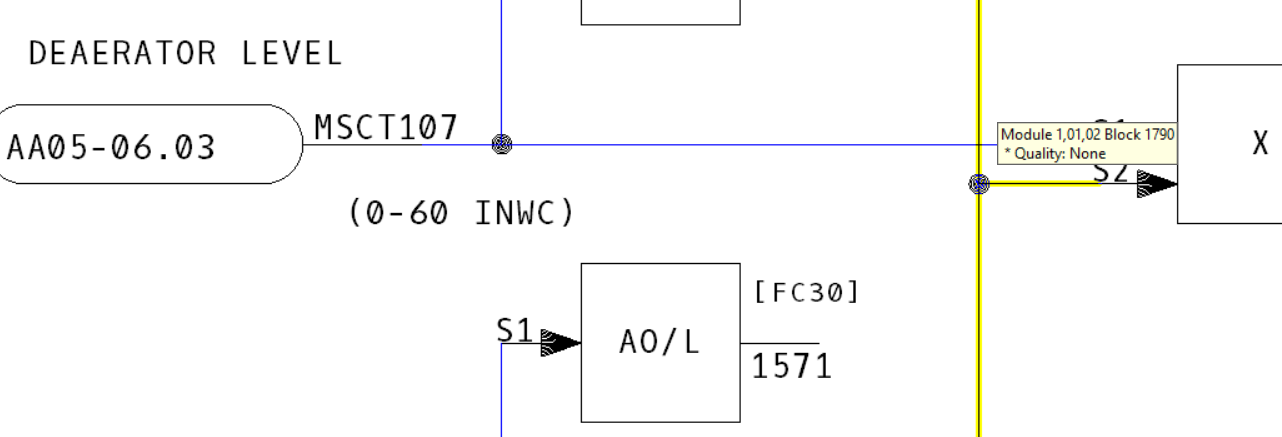
You've probably noticed the first new feature.  Now, when you mouse over a signal line on a CAD/CLD, it highlights and shows a tooltip with the block number and the quality type of the signal.  This is handy for quickly decoding a visual rat's nest of signals.

Hovering the mouse over a signal line highlights it in yellow.

If you want a better look, simply click on the signal line.  The highlight will "stick".

The line is now sticky-highlighted in orange.


Input Trees

You can visually display the "tree" of inputs for a block by right-clicking on a function block and choosing "Show Input Tree For This Block".  All the signals leading into the block and their ancestors are highlighted in red.


From a function block's context menu, you can display the input tree for a block.

If you trace the signal onto another sheet via the IREF, the input tree highlight continues on the adjacent CAD/CLD.  


Of course, it depends on the particulars whether this sort of visual signal tracing is helpful.  Many configuration diagrams contain feedback loops, causing virtually every block on the sheet to become highlighted.  

If an IREF is connected to an OREF on the same sheet, both will be highlighted, of course.

Here, for example, the input tree for Block 4109 has been shown.

Input signal tree for Block 4109.

Zooming out, we can see that an OREF is highlighted, as well as a number of IREFs.


Luckily, it is quick and easy to see why.  Hovering the OREF signal shows that it is in fact the identical signal that comes in the IREF in the lower left of the diagram.

The yellow highlight shows that both the OREF and IREF are connected to Block 4219.


Output Trees

Output trees can be displayed in the same way, and are shown in green.


Both input and output trees can be shown at the same time, for different blocks, or the same block.


Note: It's worth knowing that the input or out signal tree is calculated "on the fly," when you load a document.  Most of these trees would be very large indeed, if they were computed in totality for the entire system.  This "on the fly" tree building should not affect you if you are physically tracing signals from sheet to adjacent sheet, but if you "skipped ahead" without going through connecting sheets, lines would not be highlighted, even if they were in fact ultimately in the ancestor or descendant tree of the root block.


Quality

The new line information also gives you more information about signal quality.   Of course, you can already see if a line has quality, based on whether it is black or blue. 

Block 1790 is black, and has no quality.


Block 1790 is 133 is blue, and has PROCESS quality.

And this signal coming in from a DI/B block has PROCESS, COMMS, and IMPORT quality.

We hope you find this extra visual support for DBDOC's signal tracing capabilities handy.  Let us know what you think!

Thursday, October 22, 2020

DBDOC 11.2 is ready to go!

We're excited to release DBDOC 11.2!  This version really capitalizes on the groundwork laid in DBDOC 11.0 and 11.1 to present some game changing new features. 

Hyperview has thumbnail images in indexes.

Thumbnail images can now be shown in the indexes for all graphical document types. Thumbnails are generated when the dbdoc file is built, and are cached on the build machine.


Hyperview highlights signal lines and show input/output trees.

Mousing over a signal line on a CAD/CLD sheet now causes it to be highlighted, with a tooltip showing block number and signal quality.   You can now have Hyperview display the trees of input and output signals for any block.


Latest ABB versions supported

Supported ABB software versions include SPE 2.3, SPO 3.2, 800xA PG2 6.0, GPI, HPG, HGS.

BuildPlus has a new look, and new features.

BuildPlus icons have been updated, and toolbar buttons rearranged for clarity.


A new interface makes it easier to manage your DBDOC license.

Graphics and document support has been extended.

Extensive improvements have been made to SPlus graphics support, in the areas of live data hotspots, formatting, tags, fonts, and colors.  Extensive improvements have been made to 800xA PG2 support, in the areas of searchable text, dynamic bars, pseudotags, and graphics rendering.

There are improved automatically generated links on PDF files, and JPG images are now supported in AutoCAD drawings.

Other system changes

Software license keys are now supported, custom Function Code Support(Composer 6.5 S+ Engineering 1.3) has been added, and support for PG2 XLS (800xA Display Documentation) files has been removed.

Live data improvements

A new indicator in CIUMonController shows whether a CIUMon is able to provide data.  In addition, CIUMon can now recover automatically when RoviSys OPC90 temporarily hangs.

And much more!

You will find these updates, and many more bug-fixes and improvements in DBDOC 11.2
See the full Release Notes for further information on DBDOC 11.2 and prior versions.

Friday, May 8, 2020

Accelerate your live data with RoviSys Turbo!


Whether or not you have DBDOC, your INFI 90® System can use RoviSys Turbo. RoviSys Turbo makes DBDOC live data five to ten times faster. Composer alone is typically ten times faster when monitoring. There is no extra communication loading.

How does it work? RoviSys is the first to make use of capability in the CIU and IET800 to fetch up to 16 analogs or 16 digitals in a single GMI fetch. Setting up your IET800 with OPC90 to gain the advantages of turbo polling is straightforward and uses standard ABB parts. 

10x faster with no extra load!

RoviSys Turbo gets up to 16 analog or digital values from a module in one message, improving monitoring significantly at no extra communications load.

Put spare CIUs to good use

RoviSys Turbo can handle multiple CIUs and IET800s - serial, SCSI and ethernet. Make use of spare CIUs by providing added cabability for power users, or increasing the amount of data fetched.

Share a CIU or IET800

Use what you’ve got! RoviSys Turbo can support Composer and DBDOC at the same time using one CIU or IET800. Composer is given priority over DBDOC, while DBDOC makes good use of the CIU when available.

Try RoviSys Turbo!

Accelerate today! Visit gmcl.com or rovisys.com for more information and start your free trial of RoviSys Turbo.


Friday, December 20, 2019

DBDOC 11: Now Fully in the 21st Century

Ancient history...

When DBDOC was created in 1996, the world was a different place. The internet was in its early stages, and CD-ROMs were the latest and greatest. The task we were trying to accomplish with DBDOC was daunting -- document huge systems and make them fully searchable and cross-linked. We found MediaView, created for Microsoft Encarta, which long ago passed into the mists of time. The first version of DBDOC was constructed on the scaffolding of the MediaView system, originally intended to power multiple CD-ROM encyclopedias and the like.


Over the years DBDOC has gradually reduced its dependence on this core, while adding custom tools such as the Audit Window, Cross Reference utility, Watch Window, Error Browser and more.

Finally, with DBDOC 11.0, we decided to eliminate the dependence on a system created for Windows 3.1, as well as eliminate the significant limitations, weaknesses and quirks we had been working around for two decades. After all, one day, the old programs simply would stop working.

This required a complete overhaul of the internals of DBDOC, recreating functionality that had been provided by the venerable old MediaView framework. This was a significant challenge, but you will see immediate benefits. Moreover, DBDOC is now on a much better footing for new development moving forward. We no longer depend on components last touched in 1995!  Do you remember Windows 95, 98, NT4, 2000 and XP? They all have come and gone in the time DBDOC has been serving its users on the newest operating systems and computers, using a component older than all of them.


What has been gained? 
  • Nicer to look at: MediaView text files were trapped in 1995-era RTF, whereas the current DBDOC has the full power of a modern web browser available for presentation, enabling better formatting, readability and new features. 
  • No more size limits: Because of the DBDOC's dependence on the MediaView framework, project files were previously limited to two gigabytes in size. This limitation has been entirely eliminated, opening up the possibility of building in large numbers of additional documents such as AutoCAD, MicroStation and PDF files that previously were not feasible in many situations due to the project file size cap.
  • Faster and smaller: As it turns out, DBDOC compiles are faster now, taking 60% to 80% of the time they did previously. The resulting project file is smaller, often by as much as 40%.
  • Database backed: We have also completed to move to having a fully database oriented approach. The new ".dbdoc" file is in a standard database format, which should greatly facilitate the building of new tools for, presentations of, and interfaces to the data it contains.
What has been lost? 
  • Risk: One day, Mediaview will not be workable with a new verson of Windows OS. 
  • Direct support for RTF documents:  But now you can include anything that you can export as PDF.
We look forward to supporting our clients with DBDOC for many years to come.

Tuesday, September 24, 2019

A more efficient approach to live specs

Until DBDOC 11.1, "live specs" were a kind of live loop annotation.  Although simple conceptually, this caused a number of problems in practice.  For one thing, although "live" specs are live, in the sense that they may change, they very rarely do, and certainly not at live data fetch timescales.  So having live specs turned on for a block could cause the repeated fetching of tens of items, clogging up bandwidth for no benefit whatsoever.

In addition, it is laborious to compare the live spec values with the static spec values.


The solution in 11.1 is to display live specs integrated with normal layered specs on CADs/CLDs.  The live specs are fetched only once (or if you refresh them), and the static to live spec value comparison is done automatically, with discrepancies visually highlighted.

Note that you have to choose "Enable Live Specs" from the "View" menu in order to get this capability!